
Many visitors default to Google Translate, but on ordinary mainland networks Google services are not a reliable everyday online translation plan—yet you still need to read menus, confirm allergies, and show drivers Amap / Didi pins or Chinese addresses. Pair whatever apps you carry with our essential Chinese phrases for offline cards.
A working China internet connection does not guarantee access to Google, WhatsApp, Instagram, ChatGPT, Gmail, or other overseas services. Download language packs where available, save Chinese addresses and phrase screenshots, and do not depend on overseas apps for same-day translation, login codes, hotel chats, or emergency communication. For the access-risk layer, use the VPN guide, public Wi-Fi guide, and internet troubleshooting checklist beside your internet setup plan.
Fast operating stack
Daily app
Baidu Translate for menus, signs, screenshots, and quick voice help.
Backup app
Youdao for harder word lookups, ingredient nuance, and second opinions.
Offline fallback
Google or Apple Translate only when Chinese-English packs are already downloaded and tested.
Treat translation as a stack, not a single magic app: photo first for printed Chinese, voice only for short exchanges, and text mode when accuracy matters.
Photo menus
Best first move for menus, labels, notices, and mini-program screenshots.
Live voice
Useful for one short sentence at a taxi, shop, or hotel desk.
Copy and show
Safer for addresses, booking notes, allergies, and any line you can paste.
Weak-signal fallback
Offline packs, saved addresses, phrase screenshots, and battery reserve keep the day moving.
China Translation Apps: Fast Answer
Independent travel runs smoother when translation lives in apps that actually open. The simple setup is: Baidu Translate (百度翻译) as the daily app, Youdao (网易有道翻译) as the backup for harder words, and Google Translate or Apple Translate only as a pre-downloaded, tested offline fallback when your phone supports the needed language packs.
The operating order is just as simple: install the apps, download offline languages where each app offers them, then airplane-mode test text, camera/photo, and voice/conversation separately. After that, use one of the three walkthroughs below: photo translation, voice translation, or text translation.
Baidu
Daily camera
Youdao
Word depth
Tested
Offline modes
Baidu, Youdao, and Google Roles
Choose the app by role first, then follow the separate photo, voice, and text walkthroughs below. Do not make Google your only plan for mainland China.
📷Baidu Translate (百度翻译)
Use it as: the main daily app.
Strong for menus, signs, photo translation, and voice mode; stable on the mainland without special network setup. Core buttons are readable, but some extra pages remain Chinese-first.
📖Youdao Translate (有道翻译官)
Use it as: a second opinion and deeper lookup app.
Good for word senses, examples, and ingredient lookups when a Baidu result feels too vague. Offline, OCR, and voice behavior can be version-dependent, so test the exact modes you plan to use.
📴Google Translate
Use it as: a familiar offline fallback.
Useful if Chinese-English packs are already on the phone and you want a familiar interface. Do not plan on online Google Translate working on ordinary mainland networks, so download and test text and camera behavior before travel.
Download Apps and Offline Languages
Do the fragile install work before you fly, while your home SIM, password manager, app-store account, and Wi-Fi are easy to use. Product names shift by region, so verify the publisher, not only the icon. If you are building the whole phone stack at once, start with the essential China travel apps toolkit, then return here for translation-specific setup.
iPhone
- Search order: Search for Google Translate if you already have stable access to Google services, then search Youdao Translate / Youdao Translator (有道翻译官) and Baidu Translate (百度翻译).
- Built-in fallback: Keep Apple Translate installed and tested. Where supported, it handles text, voice, conversation, camera/photo translation, and on-device translation for downloaded languages; still use Baidu or Youdao for China-first menu, sign, and ingredient workflows.
- Storefront fallback: If Baidu or Youdao does not appear in your home storefront, try the Chinese app name. Switching an Apple ID region is a last resort because payment methods, subscriptions, and Family Sharing can be affected; do not switch regions repeatedly.
- Pre-trip test: After installation, open the apps once before travel so permissions, language packs, and login prompts do not surprise you at a restaurant counter.
Android
- Google Play phones: Global phones with Google Play can install Google Translate and fetch packs where Play reaches. If Play does not show Baidu or Youdao, use the official Baidu / NetEase download page before travel or a trusted phone-maker app store; avoid random APK mirror sites.
- Chinese-brand phones: Chinese-brand phones can use their vendor app store and search Baidu Translate (百度翻译) or Youdao Translate (有道翻译官). Verify the publisher is Baidu or NetEase, not a generic translator clone.
Before you close the app
- Open Baidu Translate and Youdao once, then accept camera/mic permissions.
- Download offline languages where each app offers them, then test text, camera/photo, and voice separately in airplane mode.
- If Google Translate is part of your plan, download packs while you still have stable access to Google services, then airplane-mode test them.
- If Apple Translate is part of your iPhone plan, download Chinese and your main language before departure and test Translate, Camera, and Conversation modes.
- Save our phrase cheat sheet offline plus screenshots of hotel addresses in Chinese.
- Pack a carry-on-compliant power bank; camera translation and navigation drain batteries quickly.
Permissions
Grant camera and microphone when prompted—photo and conversation modes fail silently if you tap deny. Switch the app language to English in settings if available to reduce menu friction.
Offline pack flow (labels vary by app version)
These screenshots show the setup pattern: open profile / Me, look for offline language downloads if the app offers them, then download Chinese plus your main language on Wi-Fi. Do not assume OCR, voice, and conversation all work offline just because text translation does.
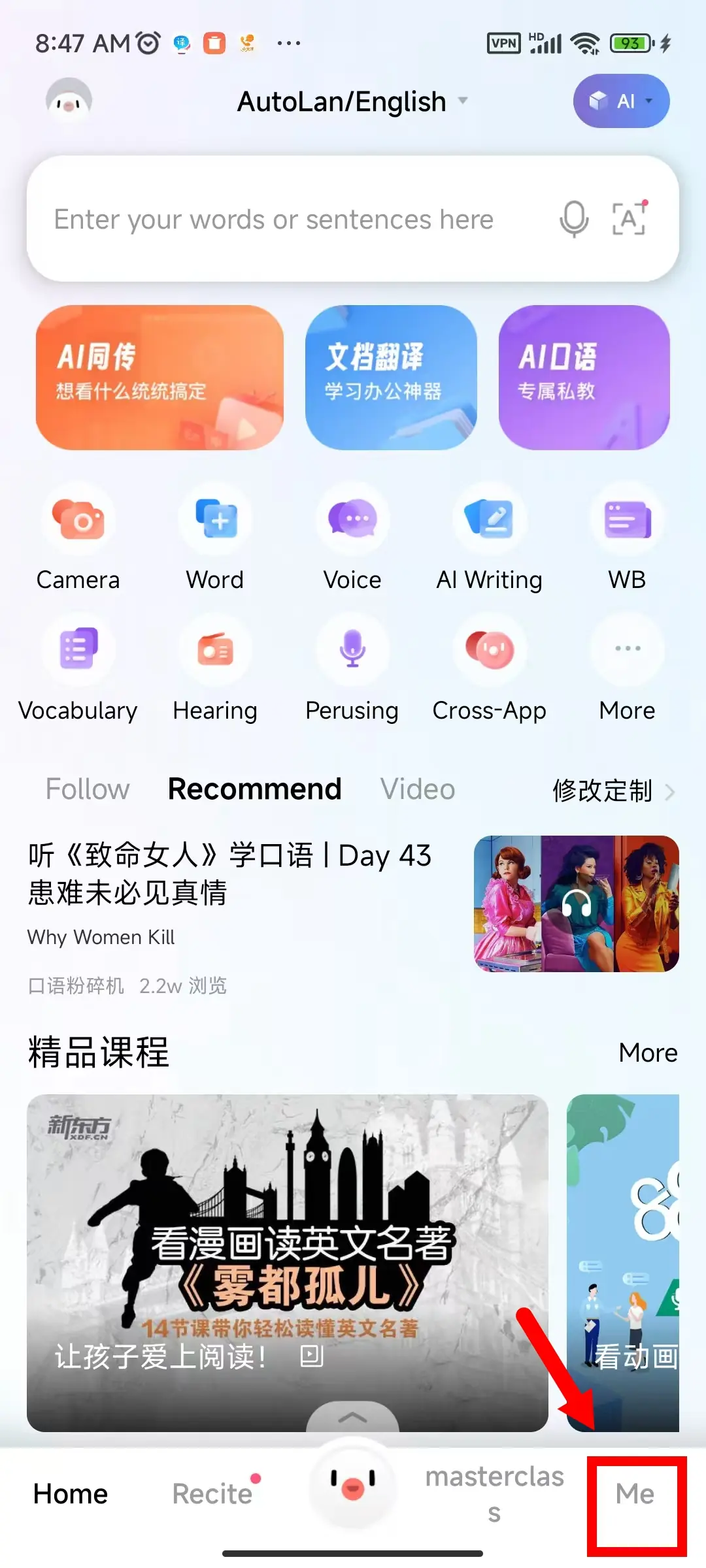
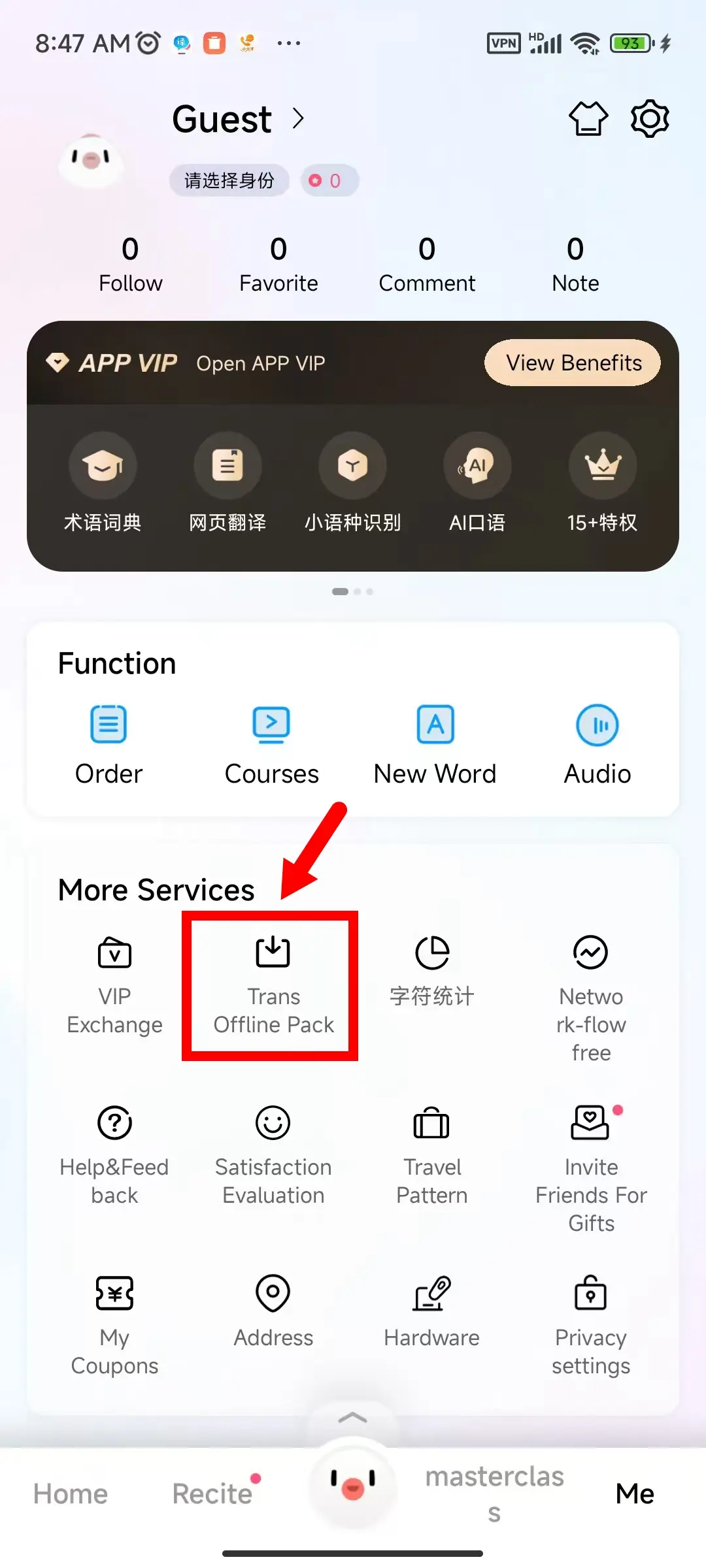
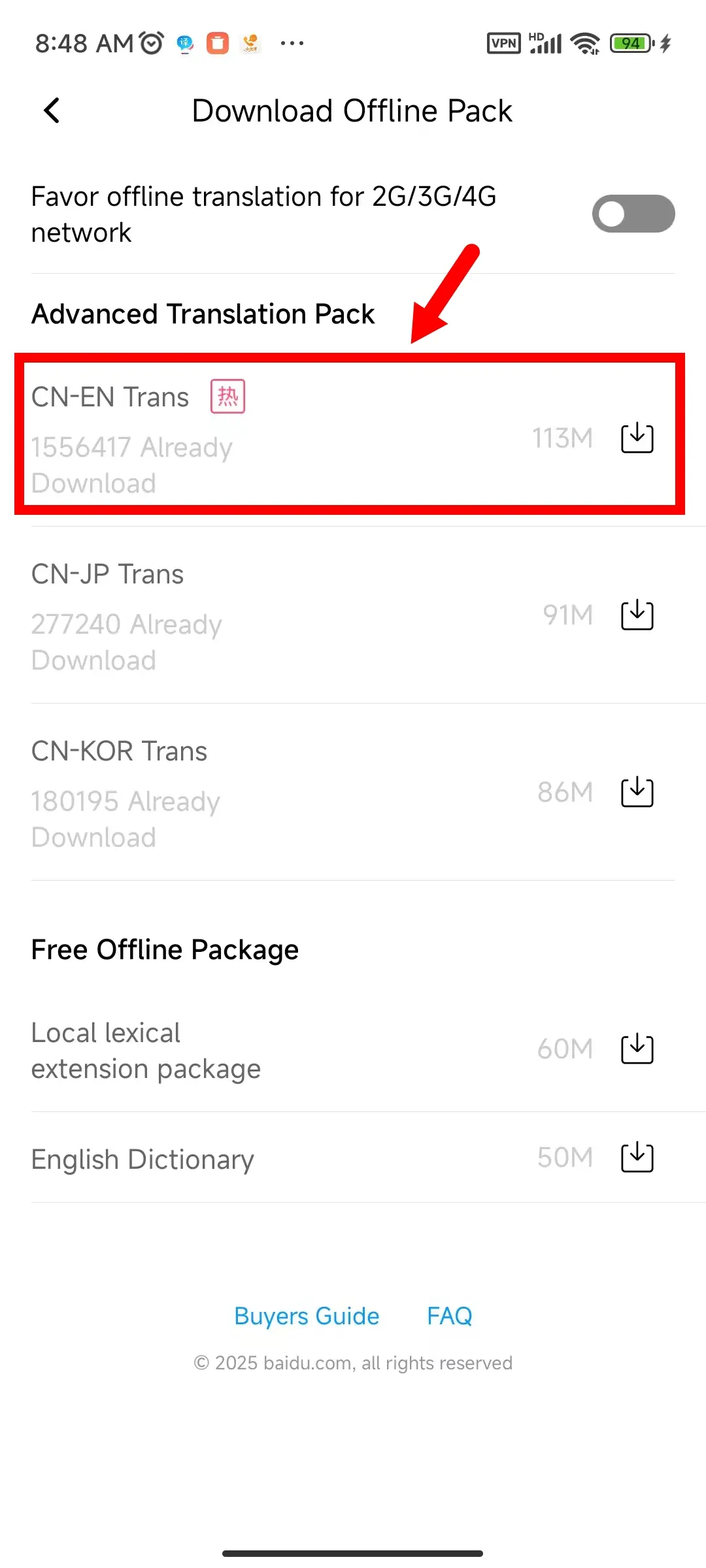
Google discontinued its mainland China Translate service in 2022, and ordinary mainland network paths often cannot reach Google online features. Treat Google as tested offline text/camera fallback plus cached phrasing, not your only lifeline. If Google packs are not already on your phone, rely on Baidu, Youdao, and iPhone's Apple Translate where available instead of spending your first travel day chasing downloads. This guide describes backups and symptoms, not VPN or proxy setup; use the China VPN guide for that decision.
Photo Translation for Menus and Signs
This is the first method to try when Chinese is already printed or displayed in front of you: menus, product labels, ticket screens, mini-program screenshots, signs, and notices. Baidu Translate is the main example here because it is stable on the mainland and its camera entry is easy to find.
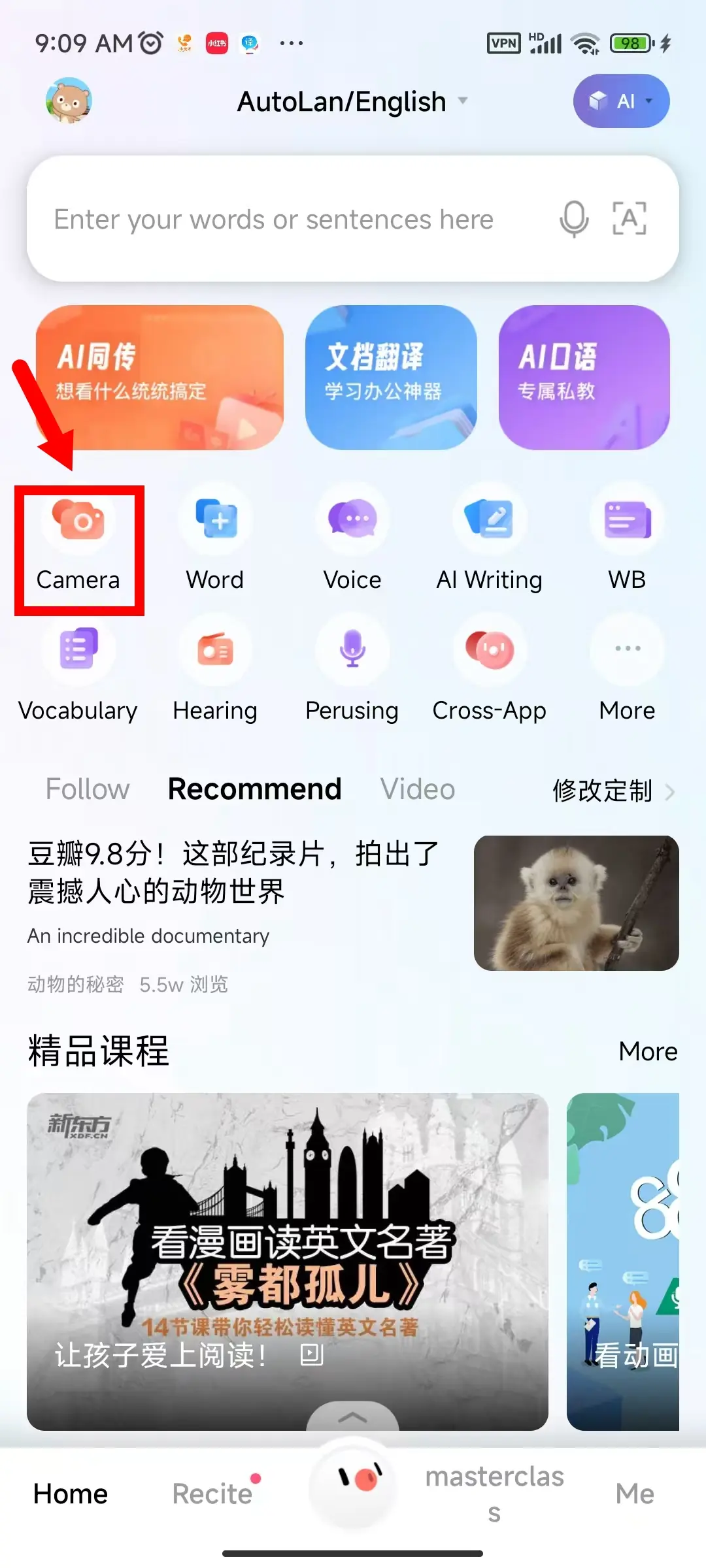
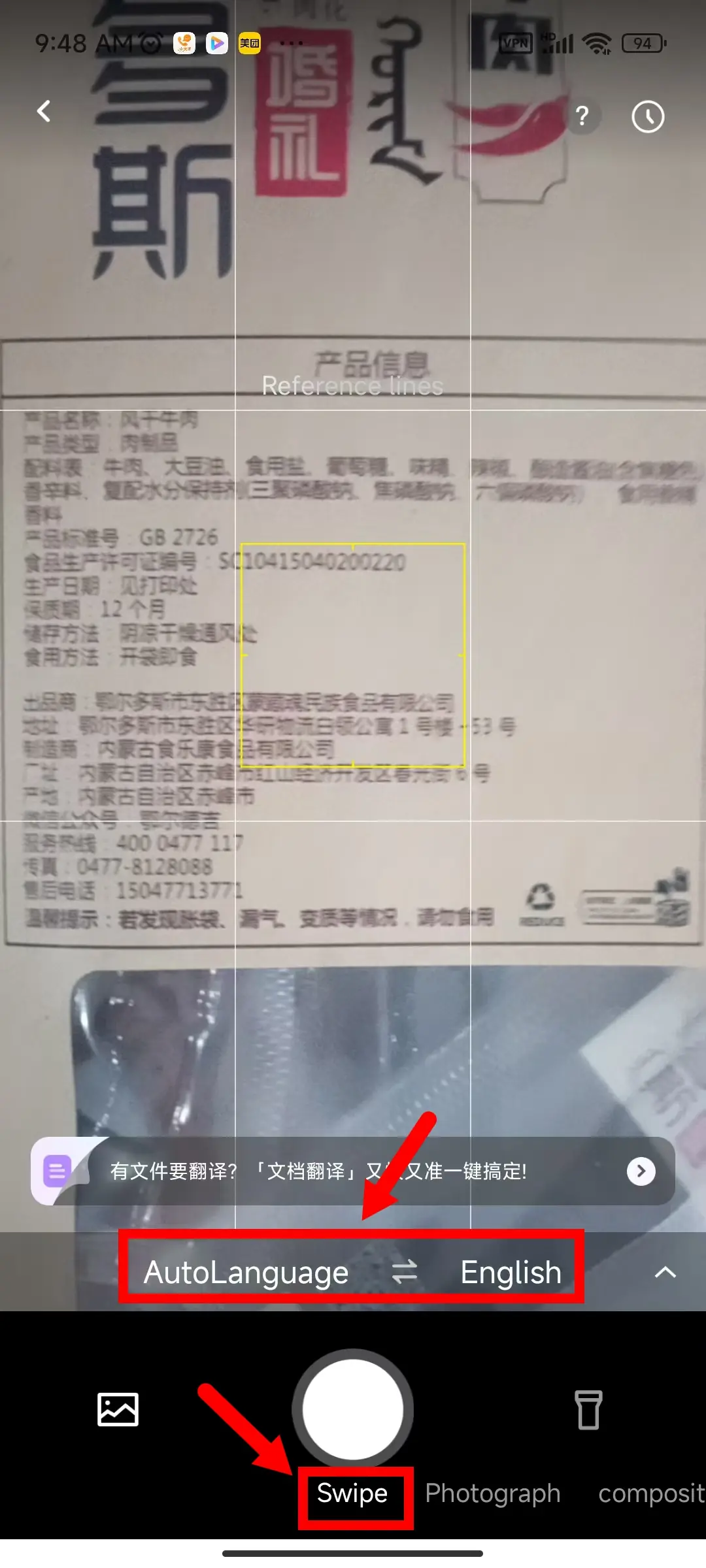
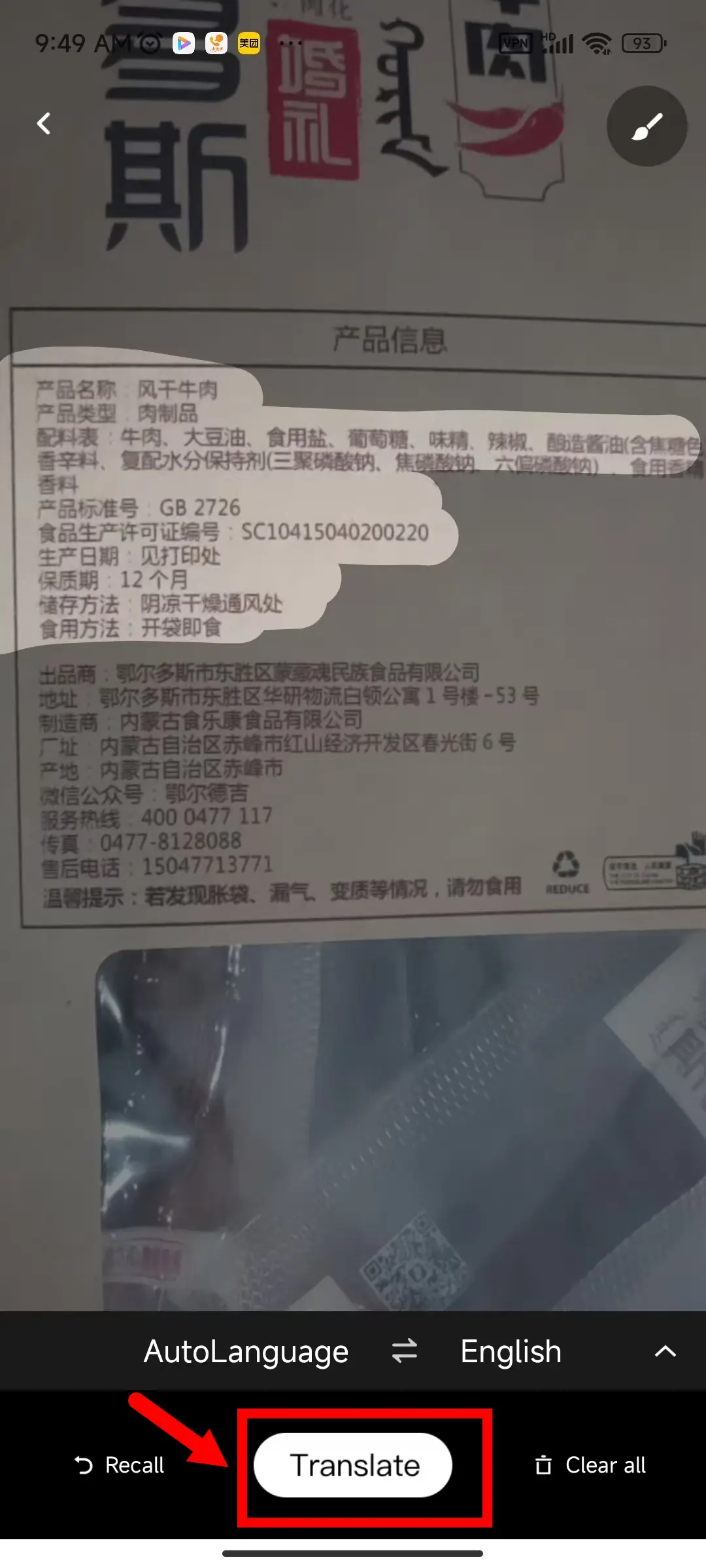
Cut glare by shading glossy paper and shooting straight-on. If a dish name sounds poetic or strange, show the original Chinese to staff instead of trusting the English guess.
Severe allergy rule
Do not rely on app OCR for severe allergies. Carry a prepared Chinese allergy card, show it before ordering, ask about sauces, oils, broths, and cross-contact, and leave if staff are unsure. Use the food allergy guide and the food communication phrases before restaurant-heavy days.
Voice Translation for Live Conversations
Use voice mode only for short live exchanges: asking directions, checking a taxi pickup point, or saying one sentence to a shop or hotel desk. Long explanations, noise, and dialect break the flow quickly.
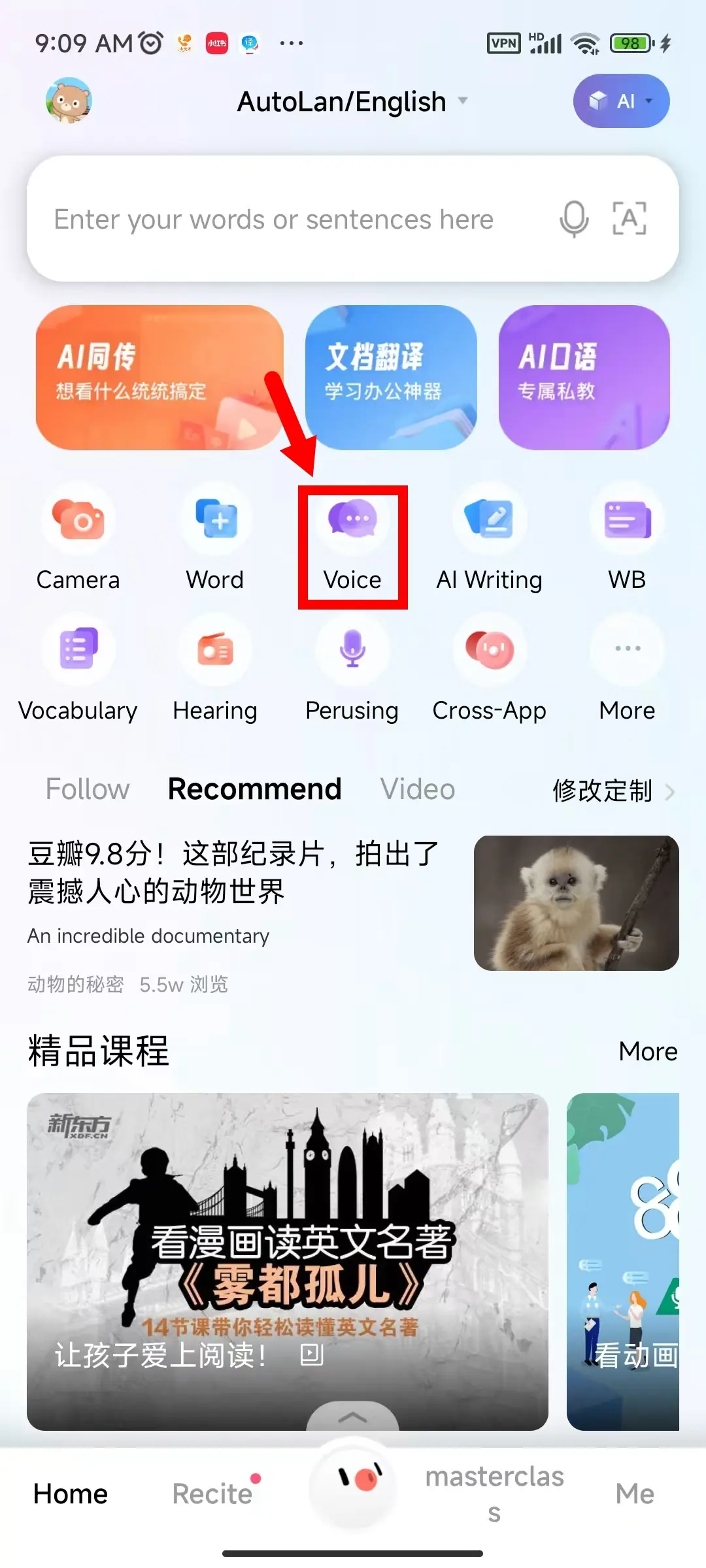
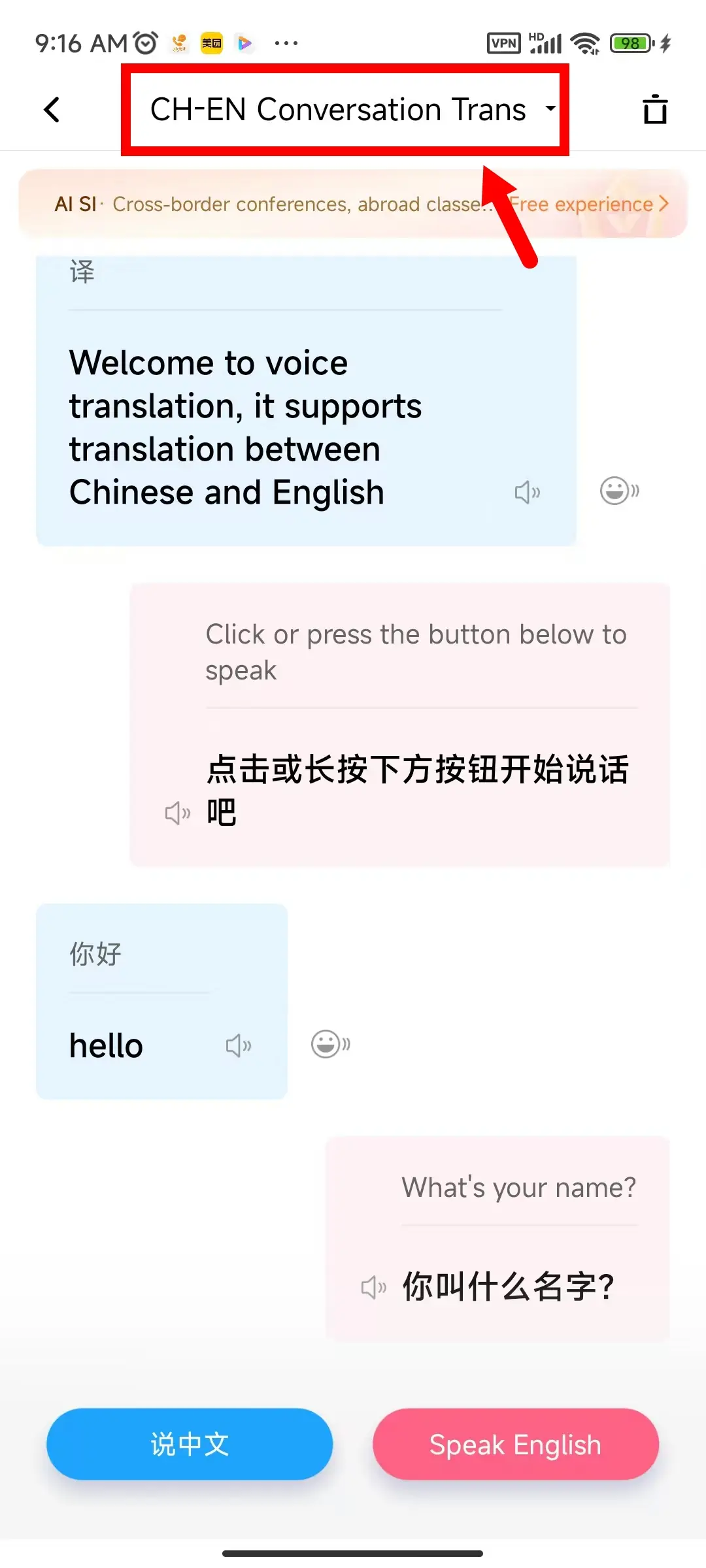
Speak one short sentence at a time and assume live voice needs data unless you have tested that exact mode offline. In taxis or Didi pickups, show the Amap / Didi destination, Chinese hotel address, or map pin instead of trying to explain the route through live voice. For practical sentence patterns, keep the communication guide nearby.
Text Translation for Copy and Show
Use text mode when you can copy, paste, or type: hotel addresses, one menu line, a WeChat message, a booking note, or an English sentence you want to show in Chinese. This is also where Youdao helps: it is stronger for word senses, examples, and ingredient lookups when one line deserves a slower read.
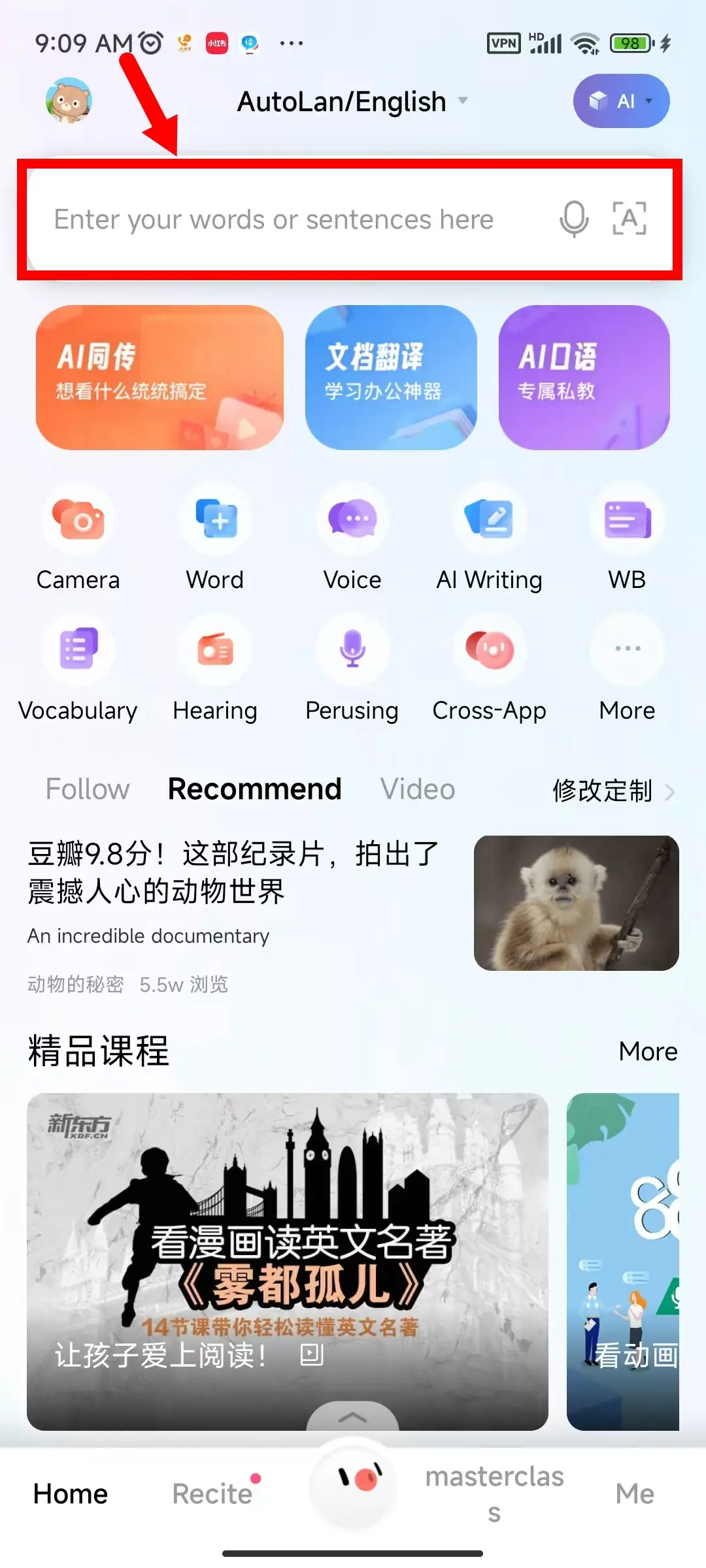
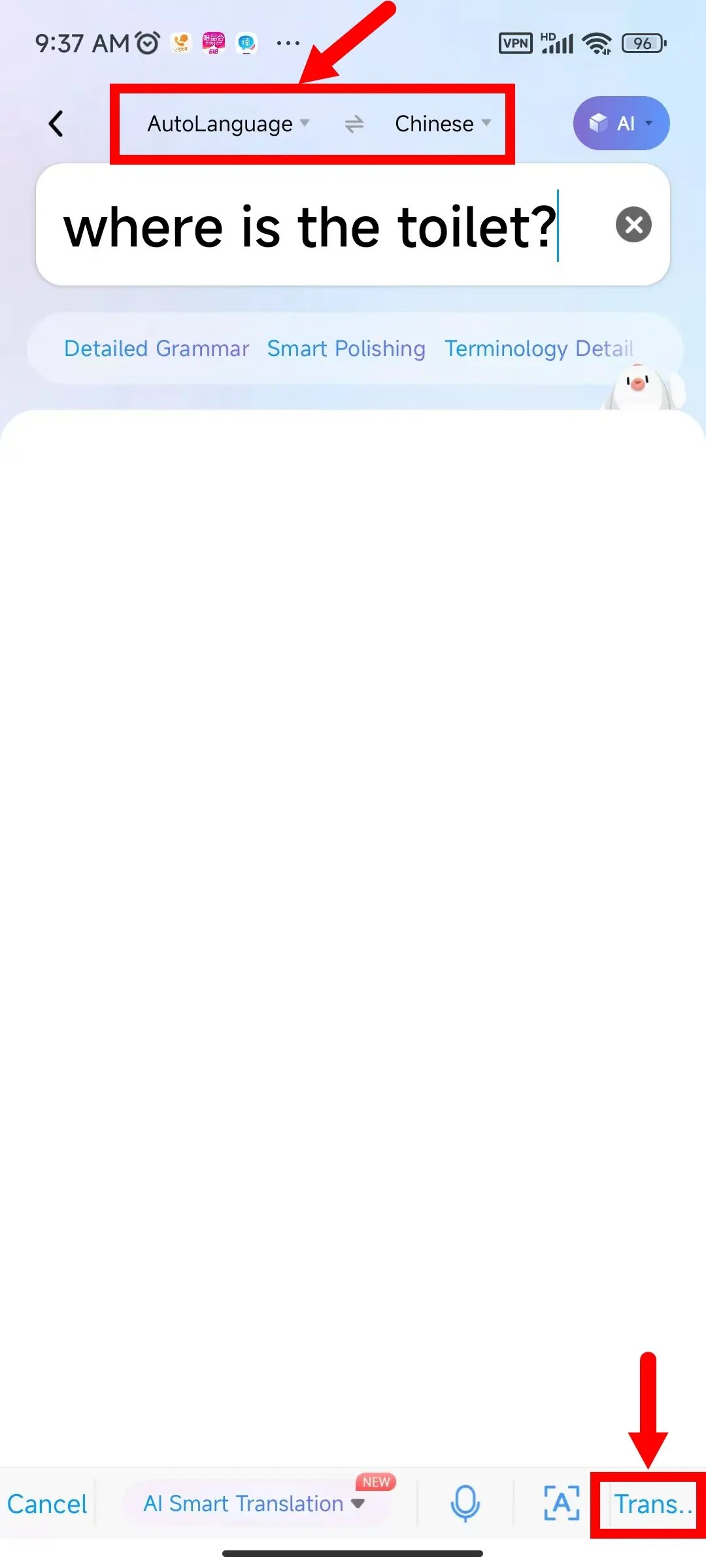
Tap the speaker icon if you want the app to read the translated line aloud. For allergies, medicine, or payment problems, treat the translation as orientation only and ask a qualified person to confirm. If the problem is partly connectivity, use the internet troubleshooting guide instead of repeatedly switching translation apps.
Weak Signal, Backup Apps, and Safety Limits
Daily backup stack
✓ Offline packs
In subway dead zones, rely on modes you already tested; open each app once on good Wi-Fi before the day starts.
✓ Battery reserve
Carry a compliant, clearly labeled power bank in your carry-on, check airline rules, and do not pack it in checked luggage. Avoid damaged or no-name packs.
✓ Saved screenshots
Keep screenshots of hotel Chinese addresses and next station names for total signal blackouts.
WeChat translate
Use WeChat long-press Translate inside WeChat chats and articles. For menus, signs, screenshots, and documents, use Baidu, Youdao, Apple, or Google OCR instead; behavior varies by version and context.
Mini programs
For Chinese-only Alipay or WeChat mini programs, screenshot the screen and run it through Baidu or Youdao's album tools. Payments: China mobile payments overview, plus Alipay and WeChat deep dives.
Wayfinding
For door-to-door wayfinding, pair this article with navigation apps in China.
Do not treat OCR as authority
Drug doses, allergies, visas, leases, and court language must follow Chinese originals and qualified people. Translation apps give a rough read only—when stakes are high, stop screensharing and get human help.
Privacy rule: Many tourist features work without a Chinese mobile number; if sync for wordbooks asks for login, skip unless you need it.
Never paste full passport numbers, complete bank card numbers, full insurance papers, or full reservation PDFs into any cloud engine "just to practice"; redact first.
For OCR, translate your own menu, ticket, address, or app screen when possible. Do not photograph other people's passports, ID cards, payment QR codes, medical records, staff screens, restricted police or military areas, or sensitive sites. For public transport or tourist notices, crop to the text you need and avoid people or staff screens.
China Translation Apps FAQ
Most live features need data. Download offline languages where offered, then test basic text, camera/photo, and voice separately; one mode working offline does not guarantee the others will.
Sources checked for this guide
- Baidu Translate official product page checked for app download positioning, 200+ language support, photo/AR, voice, image, and document translation claims: Baidu Translate official site
- NetEase Youdao official translation pages checked for translation product positioning; mobile offline behavior should still be tested by app version: Youdao Translate official site
- Google Translate Help checked for offline language download behavior, Wi-Fi guidance, and camera translation after language downloads: Google Translate offline language help
- Apple Support checked for iPhone Translate text, voice, conversations, and downloaded-language behavior: Apple Translate on iPhone
- Apple Support checked for iPhone Translate camera-view and photo-library translation behavior: Apple Translate camera view
- GOV.UK China travel advice checked for internet-access controls, permanently blocked overseas services, VPN licensing caution, and sensitive-area photography warnings: GOV.UK China internet and safety advice
- OpenAI Help Center checked for current ChatGPT supported countries and access warning outside supported countries: OpenAI ChatGPT supported countries
- FAA PackSafe lithium battery guidance checked for power banks in carry-on baggage, Wh limits, and damaged-battery caution: FAA PackSafe lithium batteries
- Google Translate mainland China service status checked against reporting that cited Google confirmation of the 2022 discontinuation: TechCrunch: Google Translate discontinued in mainland China
Beyond This Guide
You now have translation coverage; payments, phrases, internet, and maps still gate the trip. Next, tighten mobile payments, save essential Chinese phrases, choose your internet setup, test VPN and overseas-service access, keep public Wi-Fi and internet troubleshooting as backups, then move with Amap and backups on the ground. If food is a risk, use the food allergy guide before relying on menu OCR. We can advise and design the sequence for a custom route, but we do not book tickets, hotels, or paid services on your behalf.
© gochinafreely.com — Original guide by Go China Freely.