Navigation stack
What this guide solves
Travel in China is much easier when navigation, transit, and ride-hailing live in apps that actually load. Google Maps is often unreliable on the mainland for everyday routing, so independent travelers usually build a small China travel app stack before they land.
Primary app
Amap (高德地图) for live China data.
Backup app
Maps.me for offline orientation.
Second opinion
Apple Maps as a cleaner iPhone screen, not a separate China data source.
You will also learn how to search when you cannot type Chinese and how to repeat a simple Amap route workflow for city days.
China Navigation Apps: Fast Setup
Fast answer
Install Amap first, then prepare backups.
For most first-time visitors, the answer is simple: install Amap (高德地图) first, download Maps.me offline packs for backup, and use Apple Maps if you are on iPhone.
Pair the stack with mobile payments in China if you will use Didi (滴滴出行) or in-app services tied to Alipay or WeChat Pay.
Open Amap at home
Use it for city routing, metro and bus choices, walking, cycling, taxi estimates, and live traffic. Open it once so app-store, login, and permission issues do not appear at the airport.
Download Maps.me packs
Maps.me keeps downloaded maps, saved pins, and rough direction context available when mobile data drops. It is not a substitute for live China routing: in tunnels, underground stations, dense indoor areas, or fast-changing city streets, expect the blue dot, transit details, and walking guidance to be unreliable.
Save Chinese addresses
Copy-paste Chinese place names are more reliable than guessing English spellings. Screenshot your hotel address, station name, and first-day destinations.
Allow precise location
Review location permissions like any other trip; navigation apps need precise location to work well.
Amap
Live China routes
Maps.me
Offline backup
Apple
iPhone sanity check
Data first
Set up a SIM, eSIM, or pocket Wi-Fi plan with generous data, and save the internet troubleshooting checklist; maps fail fast on bad networks.
Wallet ready
Prepare Alipay / WeChat Pay before using ride-hailing or embedded map services.
Offline ready
Download Maps.me offline areas for the cities, trail areas, or provinces you will actually visit.
Pick Your Map Stack
No single map app does everything well in China. Treat the apps as a stack: Amap for live local data, Maps.me for offline orientation, and Apple Maps for quick iPhone checks.
🗺️Amap (高德地图)
Use first for: live mainland data, public transport, walking, cycling, taxi estimates, and new urban roads. Watch for: reviews, promos, and small POI names can stay Chinese even when the main interface is usable.
📴Maps.me
Use first for: signal gaps, hiking, overland legs, bookmarks, and offline orientation. Watch for: metro exits, new bridges, local transit frequency, and Chinese nickname search may lag Amap.
🍎Apple Maps
Use first for: short urban stays, iPhone users, and a cleaner English-friendly second screen. Watch for: Apple Maps in mainland China uses Amap mapping services, so it is not an independent data check; Amap itself is still stronger for deep POI search, Chinese names, car-hailing panels, small restaurants, local malls, pickup points, and fresh road changes.
GGoogle Maps
Use first for: rough pre-trip mental mapping only, if it already works for you. Watch for: mainland tiles, directions, and local transport data can be unreliable, so do not build a trip around it.
Bottom line: open Amap first every morning in China. Keep Maps.me downloaded, and use Apple Maps on iPhone when you want a quieter second screen.
Amap for Daily China Routes
Daily routing role
Amap is your live China routing layer.
Amap is the mainstream choice for accurate road geometry, live traffic, public transport, and everyday routing in Chinese cities.
Recent builds include more English-oriented support for overseas users, but mixed language is normal: airports and chain hotels may appear in English, while small restaurants, reviews, and deals often remain Chinese.
Use it when the ground is changing.
Traffic, road closures, metro exits, bike lanes, and taxi estimates all depend on live local data, so Amap should be the first map you open on city days.
Route modes
Taxi estimates, metro and bus routes, cycling, and walking directions sit in one place. Car-hailing panels may surface Amap partners and different provider options, but payments still depend on your wallet setup. Bike routes and shared-bike entries can help, but unlocking normally depends on Alipay, HelloBike, Meituan, or another local account, and parking rules follow the marked local zones. For when to choose each mode, see the China city transport guide.
Local coverage
Strong from megacities to many county towns. Still confirm final gates, platform exits, and road closures against signs on the ground.
Account features
Guest browsing can be enough for simple place searches and route checks, but saved favorites, synced history, ride-hailing, and some account tools may require mobile-number login.
Account setup
Install first, then use the settings path only if you need account features, saved places, or ride-hailing flows.
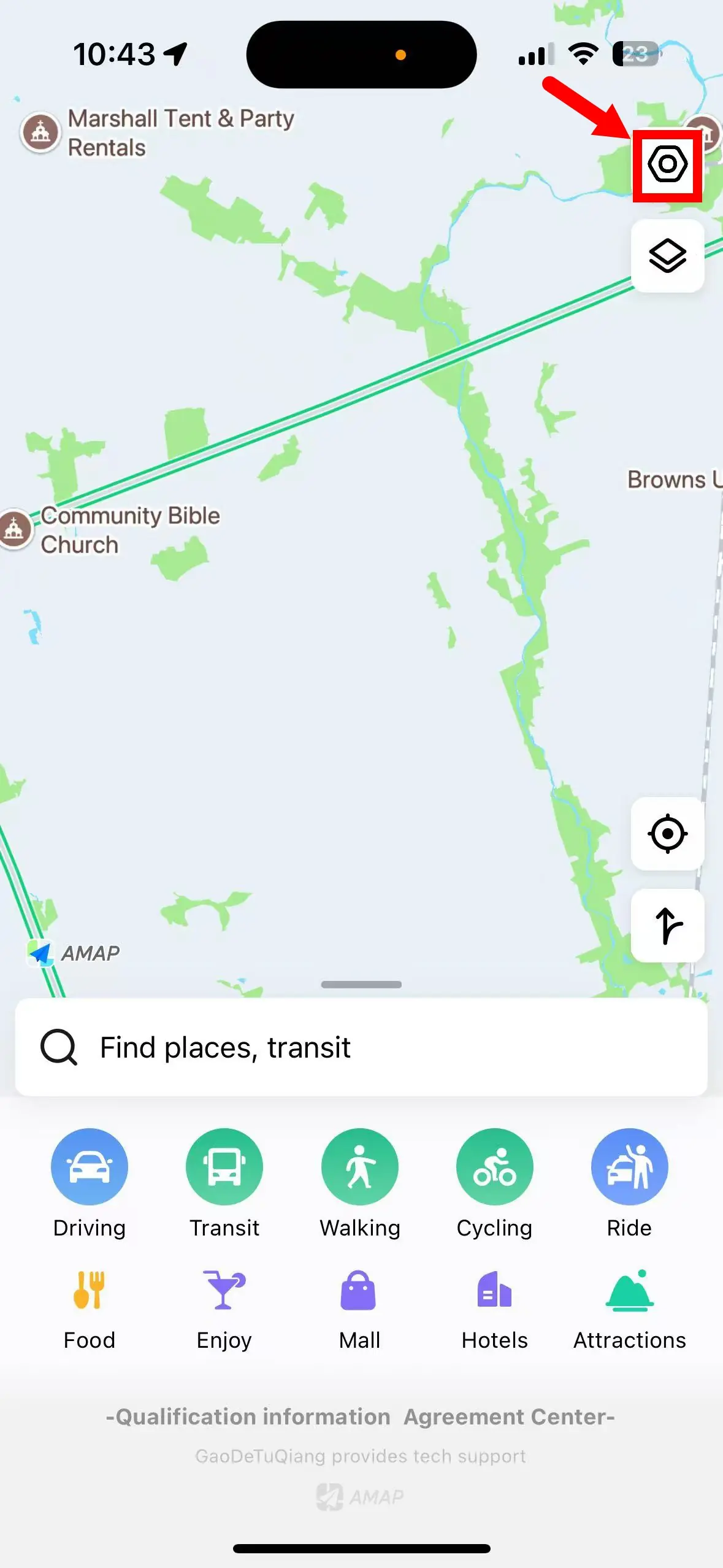
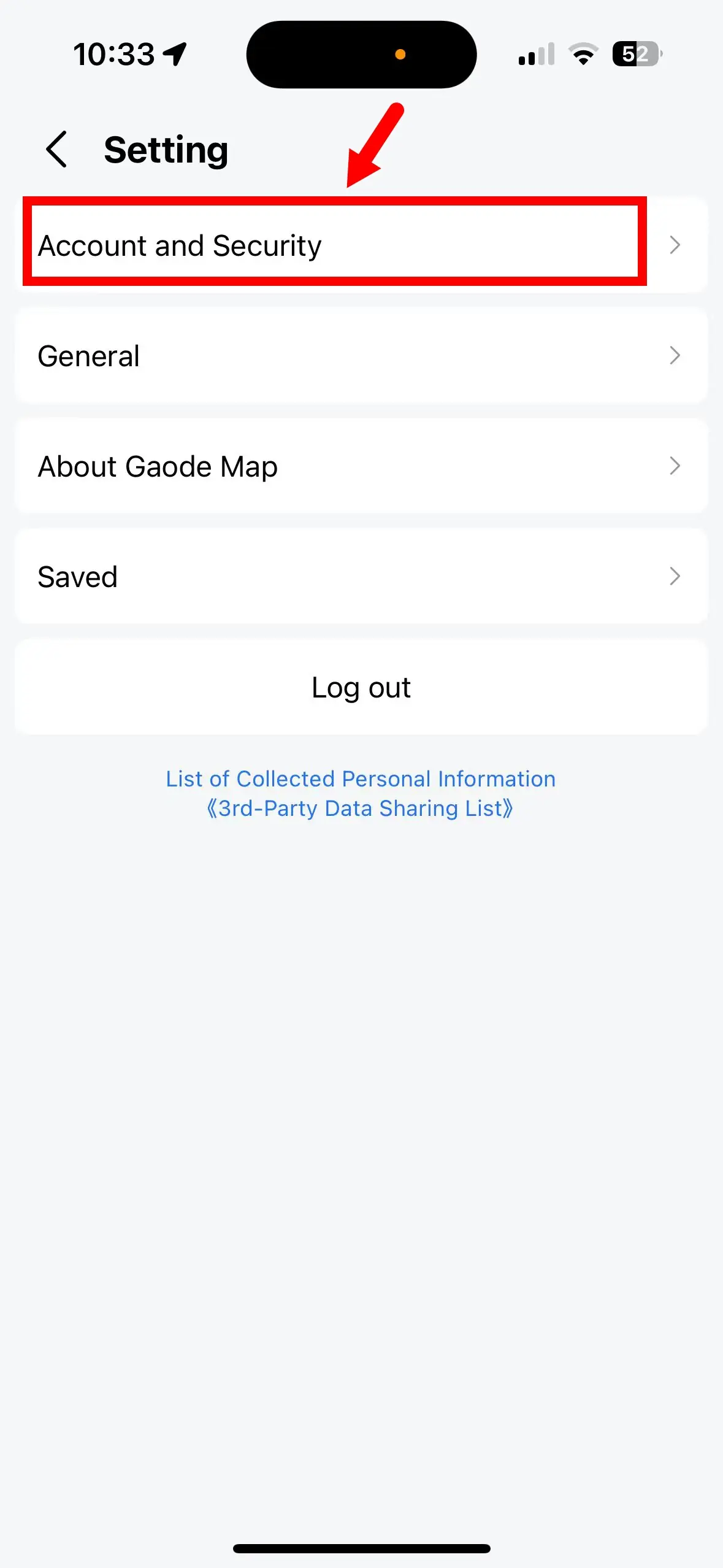
Install path
iOS: App Store -> search Amap or AMap Global by AutoNavi. Install before departure so account, region, and permission issues do not appear at the airport.
Android: Prefer Google Play outside mainland China. If you need a Chinese app store, verify the publisher is AutoNavi / Amap (高德地图) and avoid random APK download sites.
Registration
Use a number that can receive SMS abroad if you sign up before buying a Chinese SIM; otherwise wait until you have a local +86 card.
Verification codes are time-sensitive: request them on 4G/5G, not flaky hotel Wi-Fi. For SIM vs eSIM vs pocket Wi-Fi and airport pickup, see Internet in China for tourists; if codes or map data stall, use the internet troubleshooting steps.
Search Without Reading Chinese
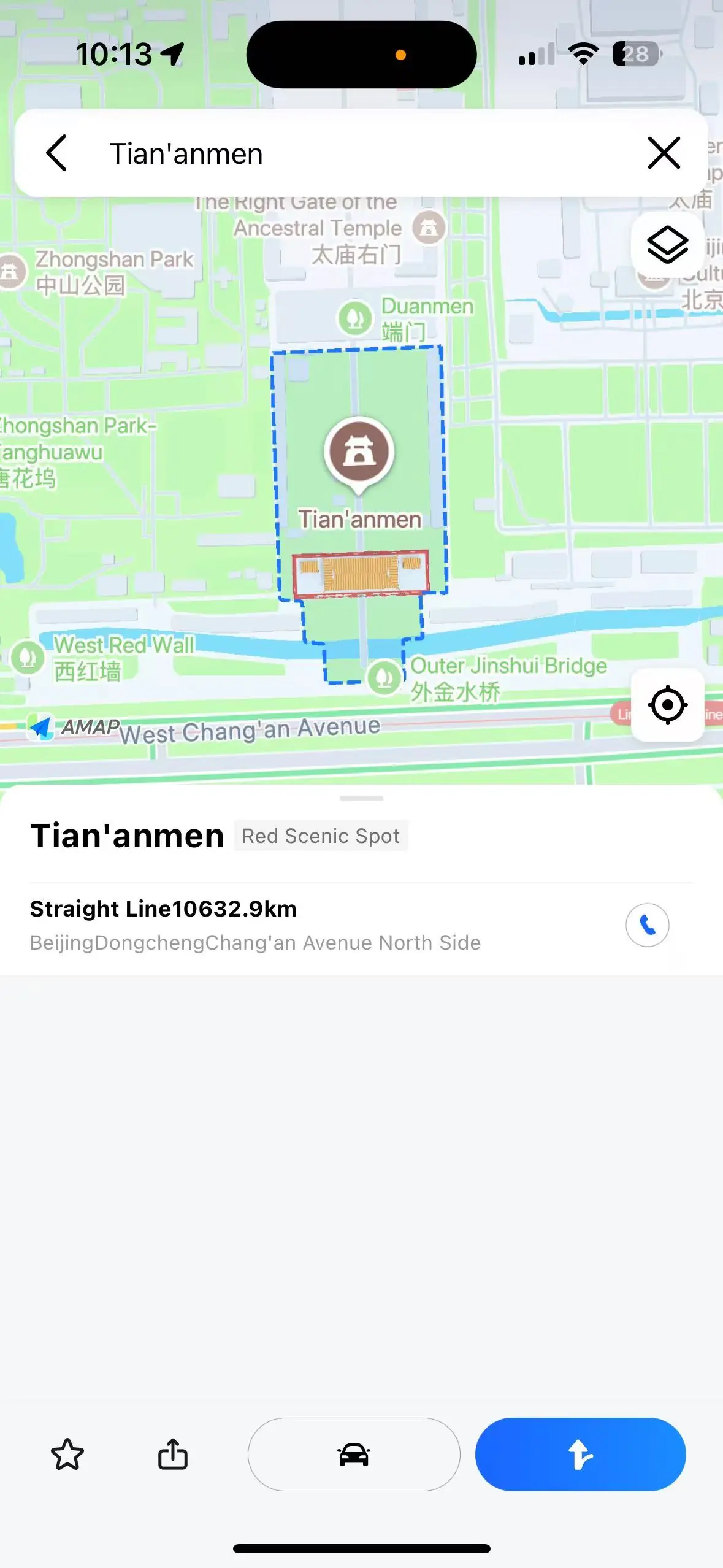
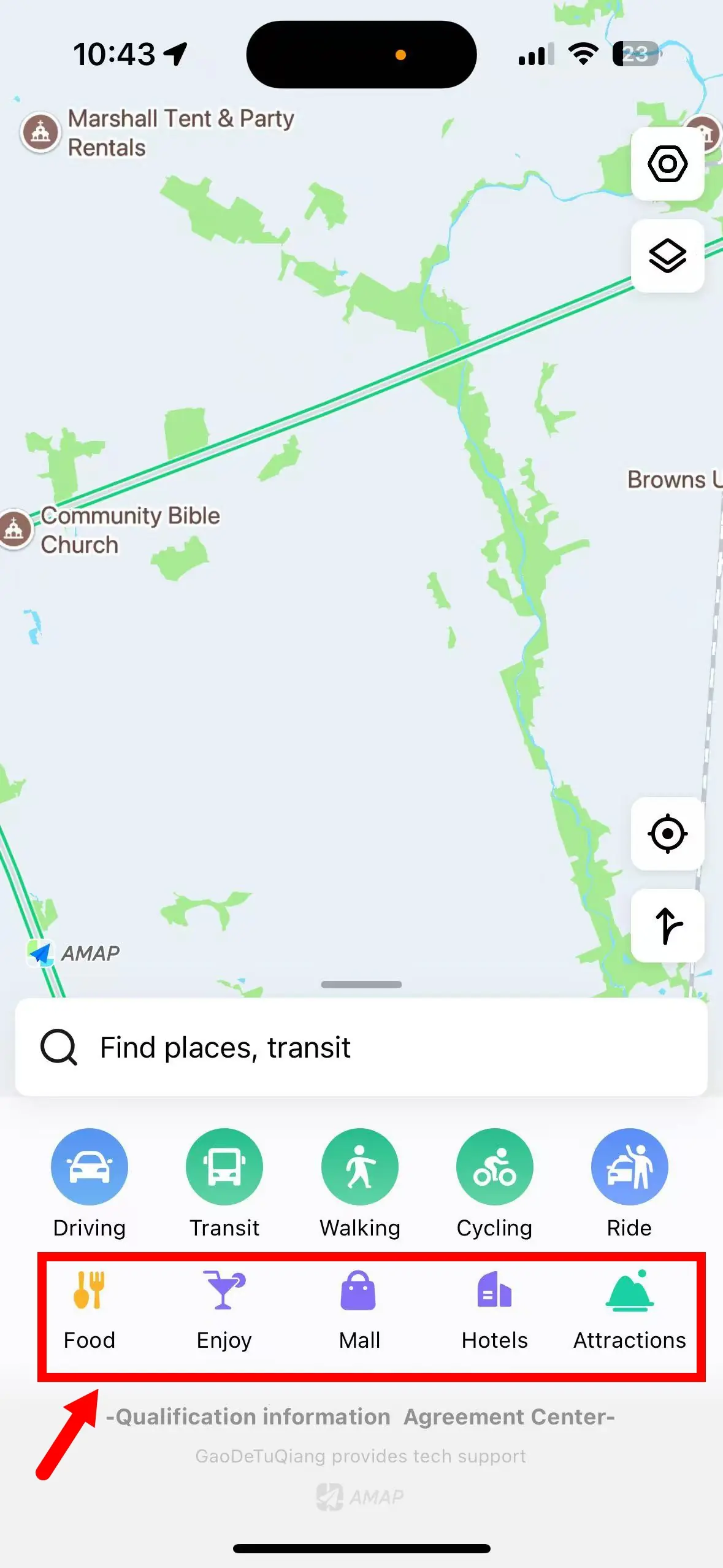
The best China navigation habit is not typing perfect Chinese. It is moving exact place text between chats, booking emails, hotel cards, and map apps without retyping. The four screenshots below match the four search habits most visitors actually repeat.
📋Paste exact text
Long-press a Chinese address from chat, your booking email, or a web page → Copy → open Amap → long-press the search bar → Paste → go.
🔤Roman-letter search
Type roman letters without tones for famous names, such as tiananmen, then pick the result that matches distance, district, and English hints.
🌐English names
Major airports, international hotel chains, museums, and famous scenic spots often accept English queries. Small restaurants and local stalls rarely do.
🍜Nearby chips
Use on-map chips like Food, Hotel, or Scenic for one-tap nearby browsing when you are already in the right neighborhood.
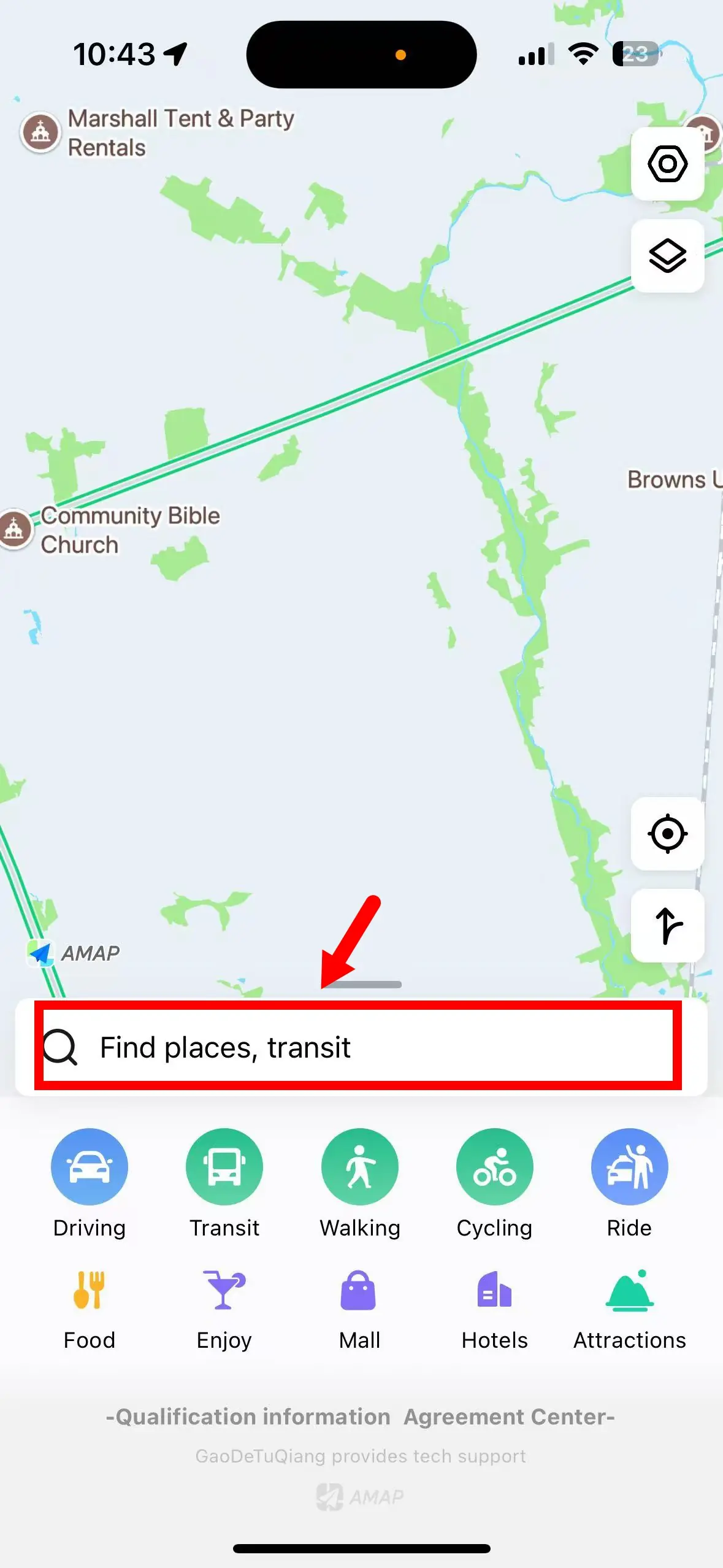
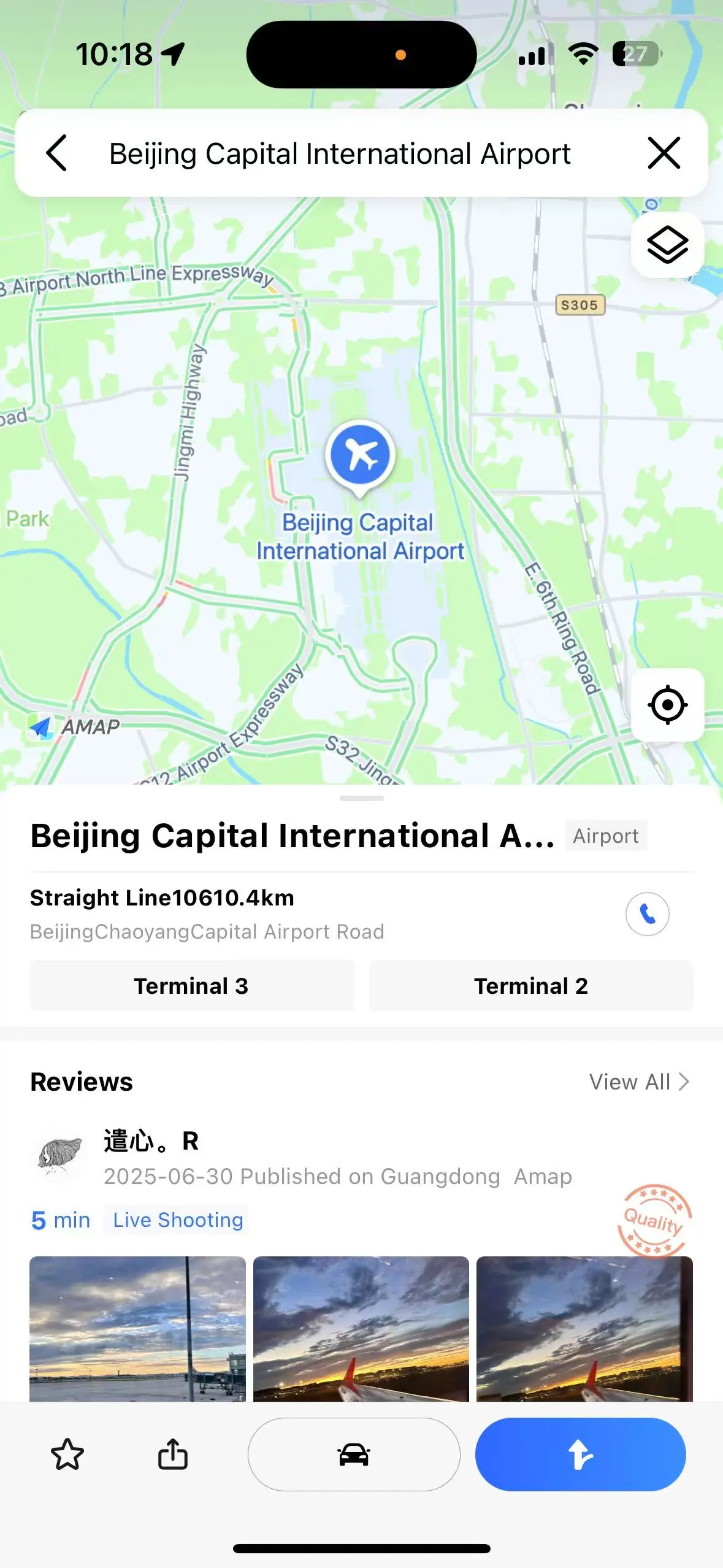
No address text? Drop a pin
If you have a visual landmark but no name, zoom in and long-press the roof, entrance, or gate. Set that pin as destination, then confirm the final entrance against signs on the ground.
If the address only exists on a sign, hotel card, or screenshot, use a China translation app with photo/OCR recognition to capture the Chinese text first, then paste that text into Amap.
Amap Route Walkthrough
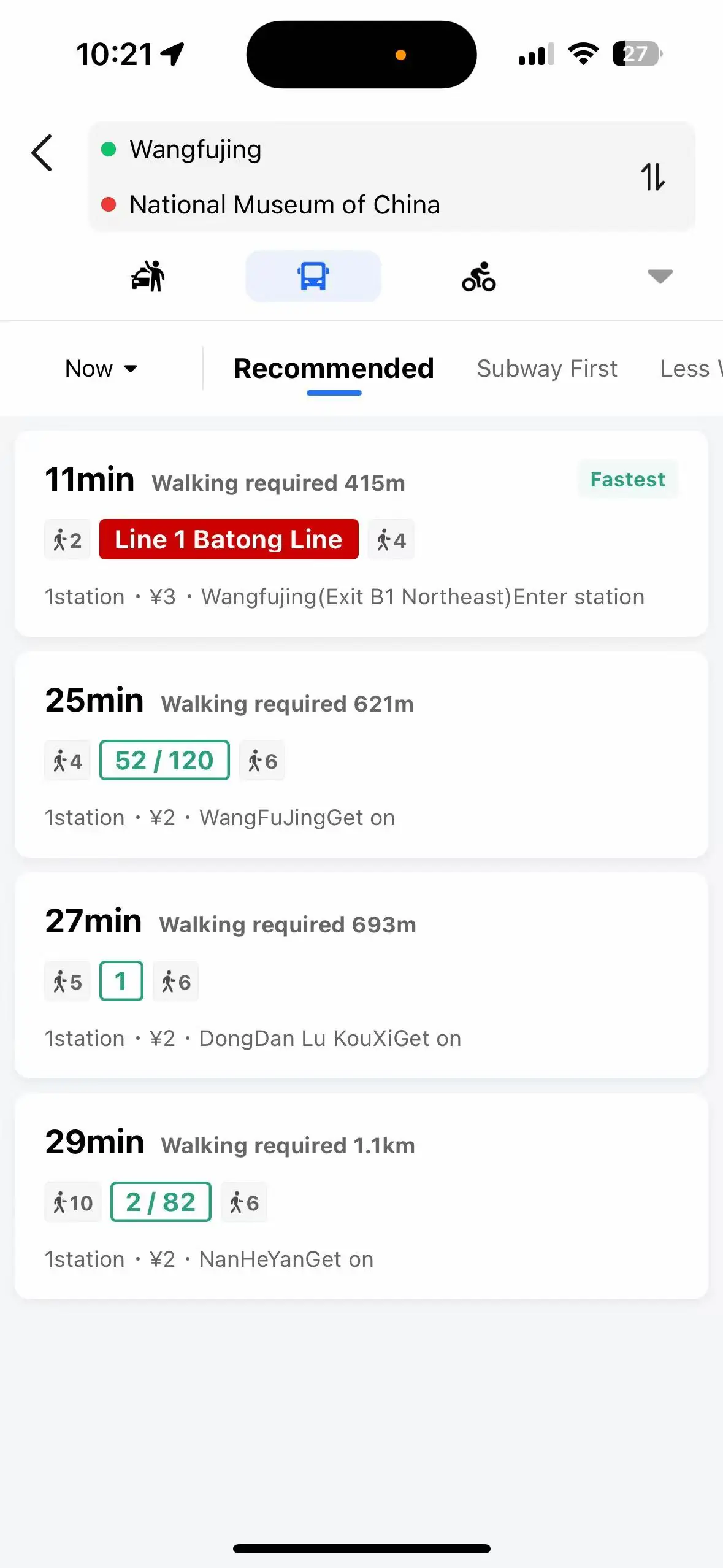
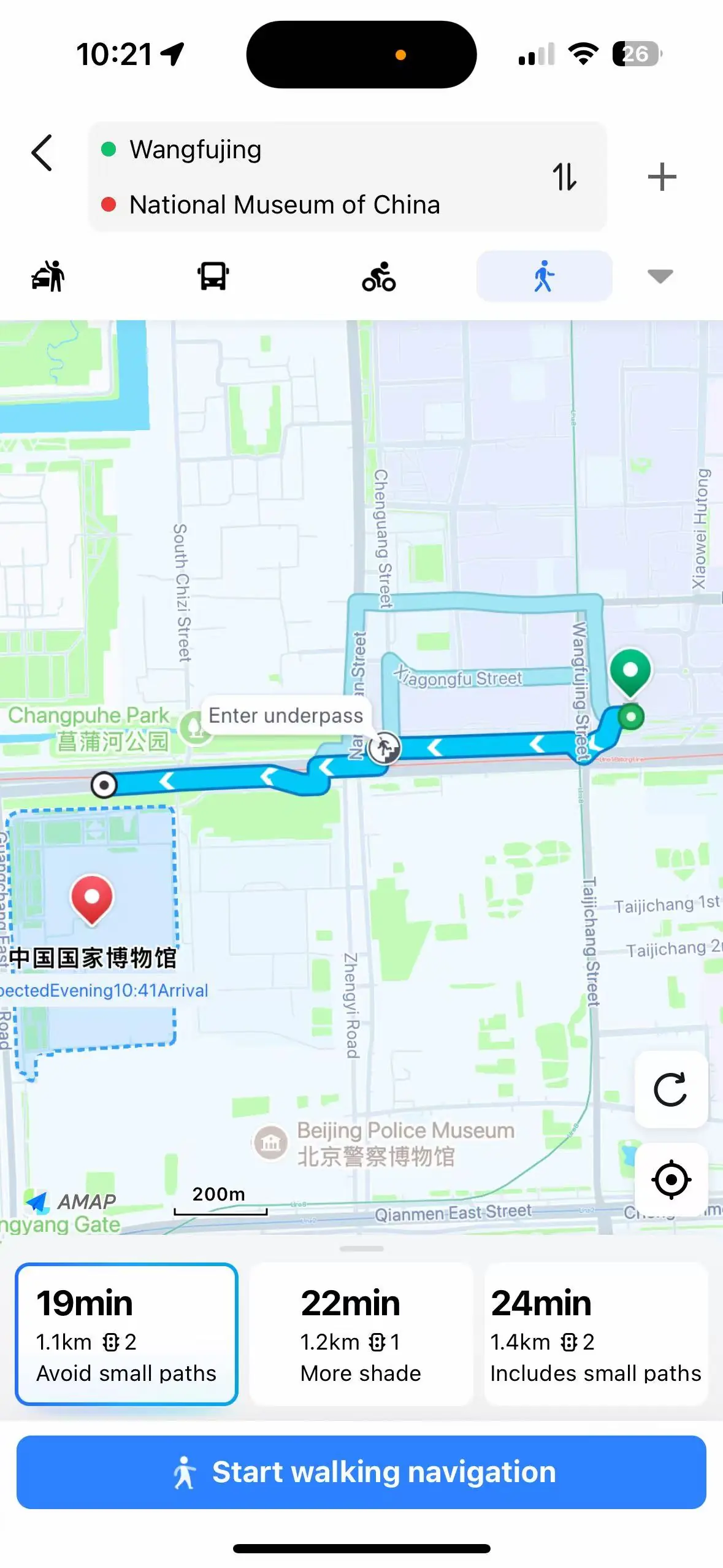
This example uses Wangfujing (北京王府井) -> National Museum of China (中国国家博物馆), but the same taps work for hotels, restaurants, stations, and museums in any city.
Follow the screenshots below
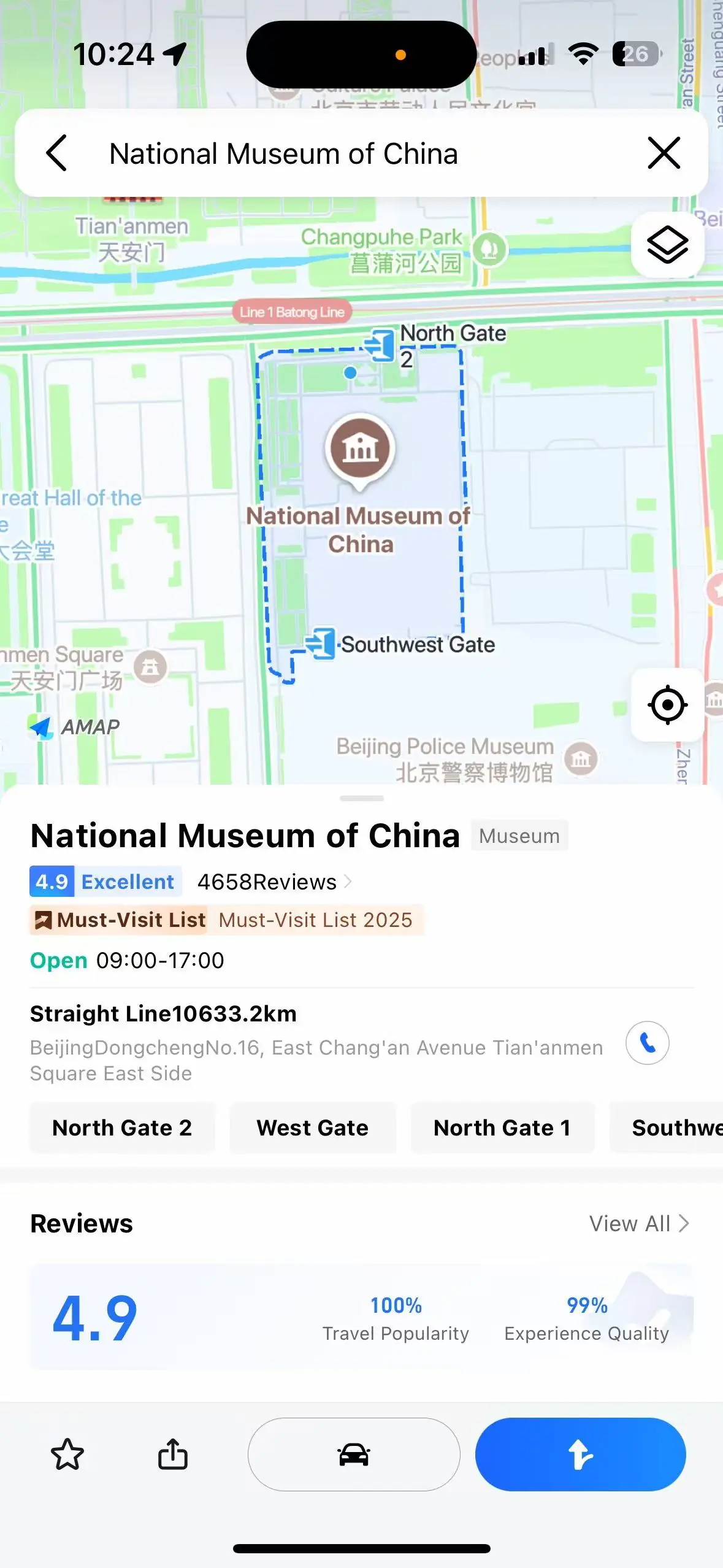
1. Open the destination
Search 中国国家博物馆 or paste your hotel-provided Chinese string, then open the destination place card and tap the blue route / navigation button.
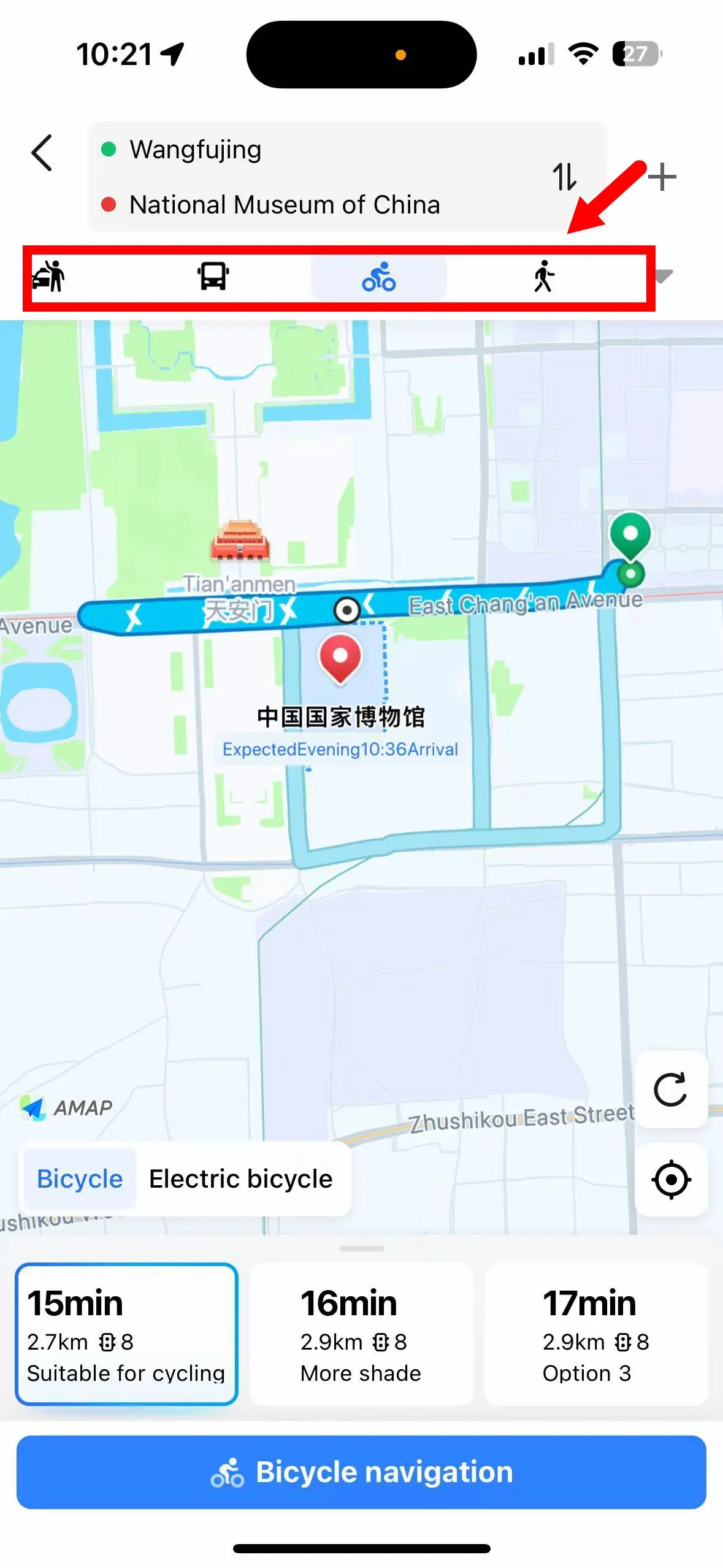
2. Pick a travel mode
Choose Taxi, Transit, Bike, or Walk. Amap car-hailing panels may show partner estimates and different provider options; finish wallet setup first if you plan to pay in-app.
3. Read transit details
For transit, open the recommended line, note exit letters, and watch first/last train times.
4. Start guidance
For walking or cycling, tap Start and follow the blue line. Keep brightness up in sun glare.
Payment setup matters for ride-hailing; see the payments overview before you rely on in-app car flows.
Offline Backup and Battery
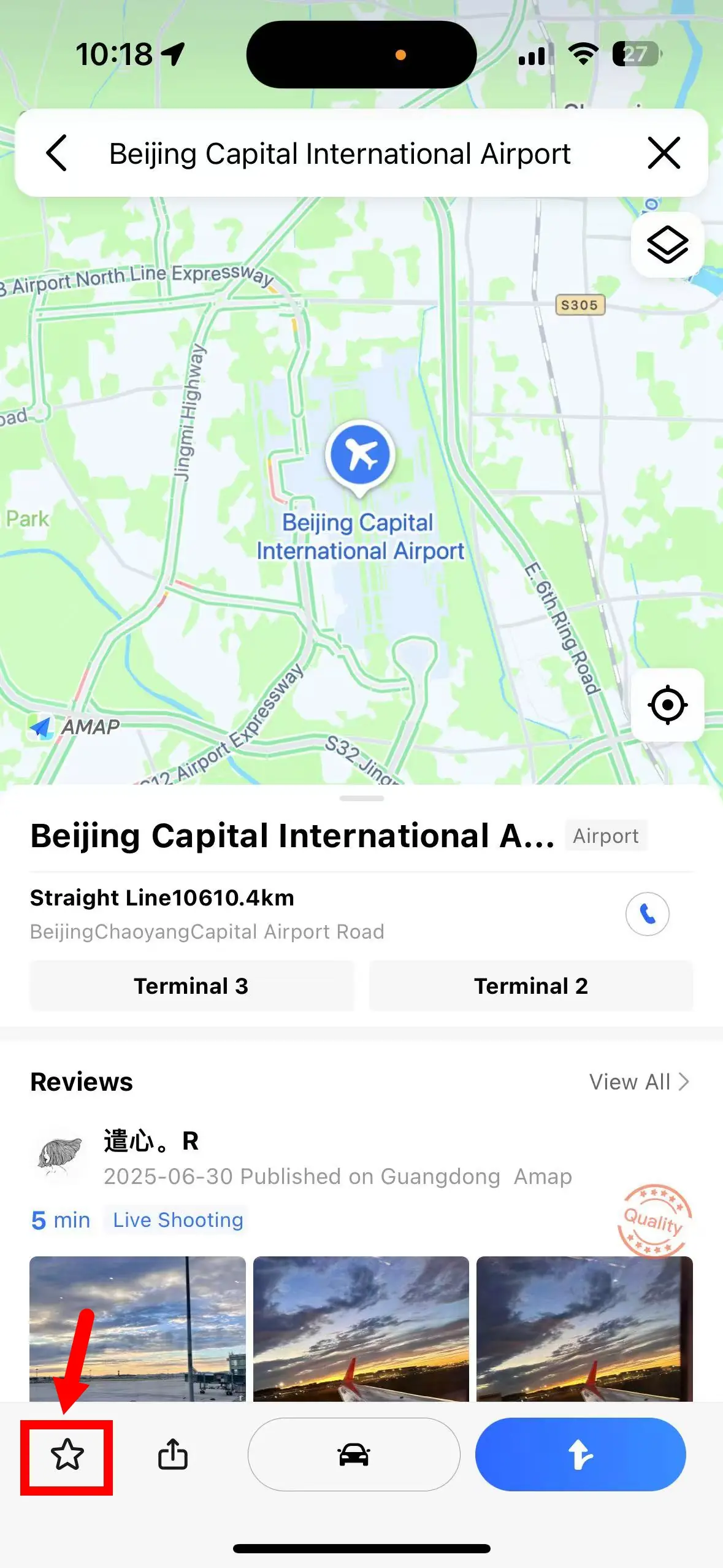
Saved-pin screen
This screenshot is a place card with the star / 收藏 button, not the saved list itself.
Three backups, not one
This last section has three separate backups: saved pins inside Amap, offline maps outside Amap, and enough battery to keep both usable.
Tap the star / 收藏 icon on a place card to save hotels, meeting points, station exits, trailheads, or pickup zones, then route back to them with one tap later.
Offline map
Use Maps.me as the offline safety net for downloaded map tiles, saved pins, and rough route context. Do not use it as the final source for metro exits, current bus timing, mall entrances, bike parking zones, or city traffic. In long tunnels, underground stations, and dense indoor areas, rely on screenshots, station signs, exit numbers, and saved Chinese addresses rather than live GPS guidance.
Screenshots
Keep screenshots of metro lines, hotel addresses, and the nearest landmark in Chinese characters.
Amap city packs
If you install the standard Chinese build of Amap and can read enough characters, offline city packs may be available, but expect version differences.
Battery
Navigation, cameras, and translation apps drain batteries quickly; carry a power bank and a short USB-C / Lightning cable. For China domestic flights, hand luggage is only the first rule: the Wh/mAh rating and 3C / CCC mark should be clear, and recalled models are not allowed. A power bank bought overseas with only CE/FCC marking can be refused at a China domestic-flight security check, so recheck airline or airport rules before flying inside China.
Affiliate disclosure: the Trip.com link below is an affiliate link; we may earn a commission at no extra cost to you. Check your phone's eSIM compatibility, data allowance, and activation rules before purchase.
Live subway exits, bus arrivals, and ride-hailing inside Amap depend on reliable mobile data the moment you land. If you want data active before clearing airport customs, check China travel eSIM plans on Trip.com.
Navigation FAQ
For most visitors it is unreliable: tiles may load inconsistently, and routing ignores local traffic rules. Use Amap as your primary planner; keep Google only if you already see accurate tiles on your device.
Sources Checked
Official and app-store references
- Amap official international site checked for real-time traffic, route optimization, car-hailing, real-time bus, shared-bike, and app-download positioning: Amap official international site
- Amap Global / AutoNavi app-store listing checked for multilingual China map positioning, traffic, ETA, transit, and route feature claims: AMap Global on the App Store
- Google Play listing checked for Amap Global app identity, positioning, and current Android availability notes: AMap Global on Google Play
- Apple privacy documentation checked for the note that Apple Maps in China uses mapping services from Amap Software Co., Ltd.: Apple Maps & Privacy
- Apple feature availability checked for mainland China support across Maps features such as turn-by-turn navigation, transit, and cycling: Apple iOS feature availability
- Maps.me official product page checked for offline maps, search, navigation, and downloaded-map positioning: Maps.me official site
- Google Play listing checked for Maps.me offline map, navigation, bookmark, GPS, battery, and OpenStreetMap data claims: Maps.me on Google Play
- Google Play listing checked for Baidu Maps route planning, taxi, transit, walking, cycling, train, flight, and real-time traffic feature positioning: Baidu Maps on Google Play
- Reuters report checked for China domestic-flight restrictions on uncertified or recalled power banks: Reuters on China power-bank flight rules
Beyond This Guide
Maps get you across town; wallets, phrases, internet, and city transport habits make the trip feel smoother. Next, tighten these pieces:
- China mobile payments: Alipay & WeChat Pay - prepare the wallets that Didi and many in-app services depend on.
- China city transport: subway, taxi, and Didi - learn when to use metro, taxis, and ride-hailing.
- China shared bikes guide - understand scan-to-ride basics before relying on bike routes in Amap.
- Trip.com app guide - keep trains, hotels, and attraction bookings searchable beside your map pins.
- Essential Chinese phrases - keep a fallback for station staff, drivers, and hotel desks when app search fails.
© gochinafreely.com — Original guide by Go China Freely.