Color cues
Last-mile rhythm
You step out of the metro station and your hotel is 800 meters away. Too short for a ride-hail, too far to walk in the heat — then you spot them: rows of brightly colored bikes lining the sidewalk, neatly parked in white-lined zones.
Action
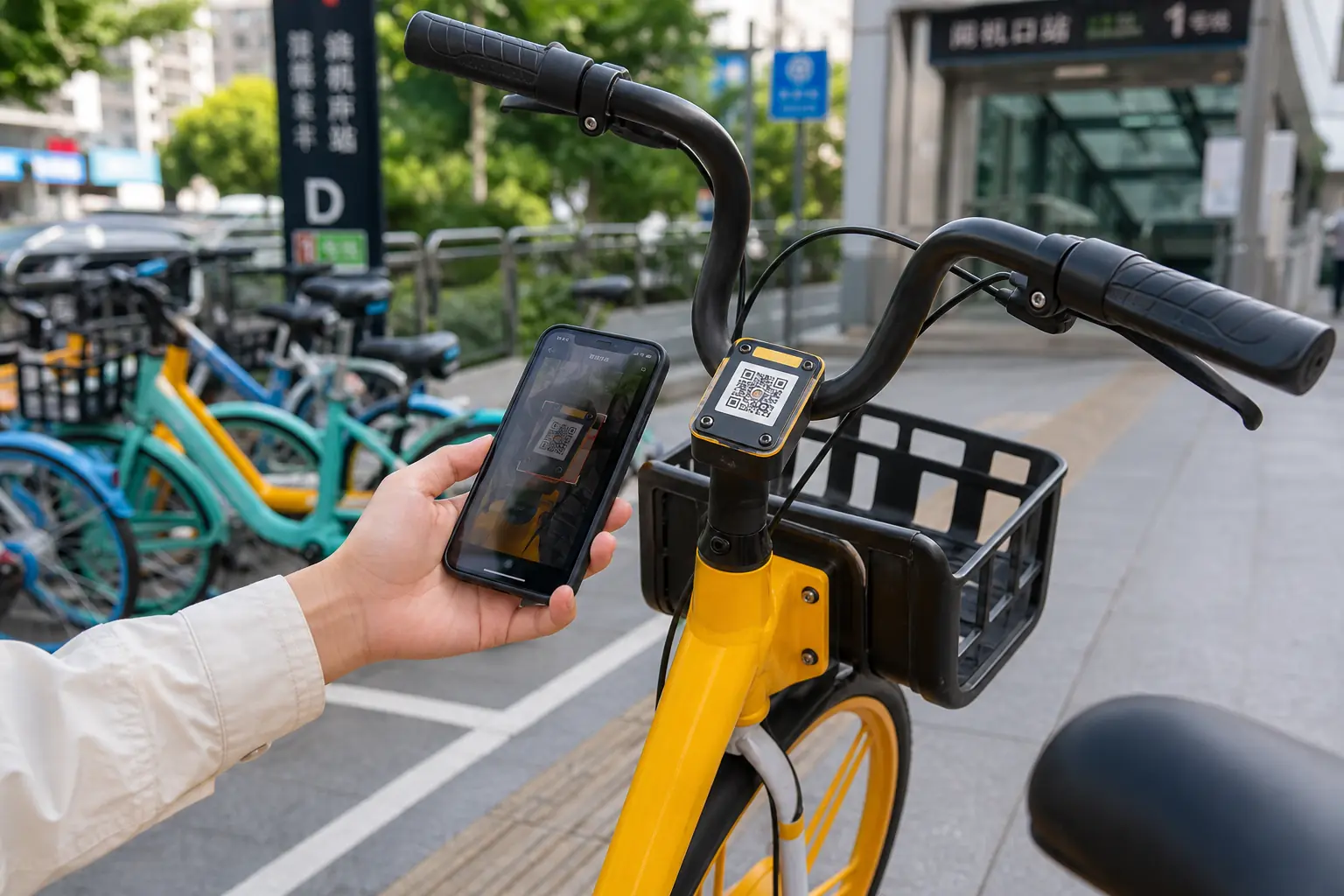
Pull out your phone, scan the QR code on the bike, and start riding.
Cost cue
A short ride can be about ¥2, depending on city, brand, and bike type.
Traveler fit
Shared bikes are a normal last-mile option in large and many smaller Chinese cities. Most tourists start with Alipay or WeChat scan, then follow the live brand prompt for phone verification, location permission, payment authorization, and parking rules.
For foreign tourists, the practical path is simple: use the wallet or app you already have working, scan the QR code on a nearby bike, confirm any deposit or pass screen before accepting, ride only short city hops, and park inside the app's allowed zone. Start with Alipay or WeChat scan, then follow the prompt for Hellobike, Meituan, Qingju, Didi, or the mainland brand app that actually unlocks the bike in front of you.
Shared Bikes in China: Fast Answer
Fast answer
Use shared bikes as a last-mile tool.
For most travelers, shared bikes work best as a last-mile tool, not a full-day transport plan. Use them for metro-to-hotel hops, riverside rides, food-street detours, and short cross-neighborhood trips when walking feels just a little too long.
Try the bike already in front of you
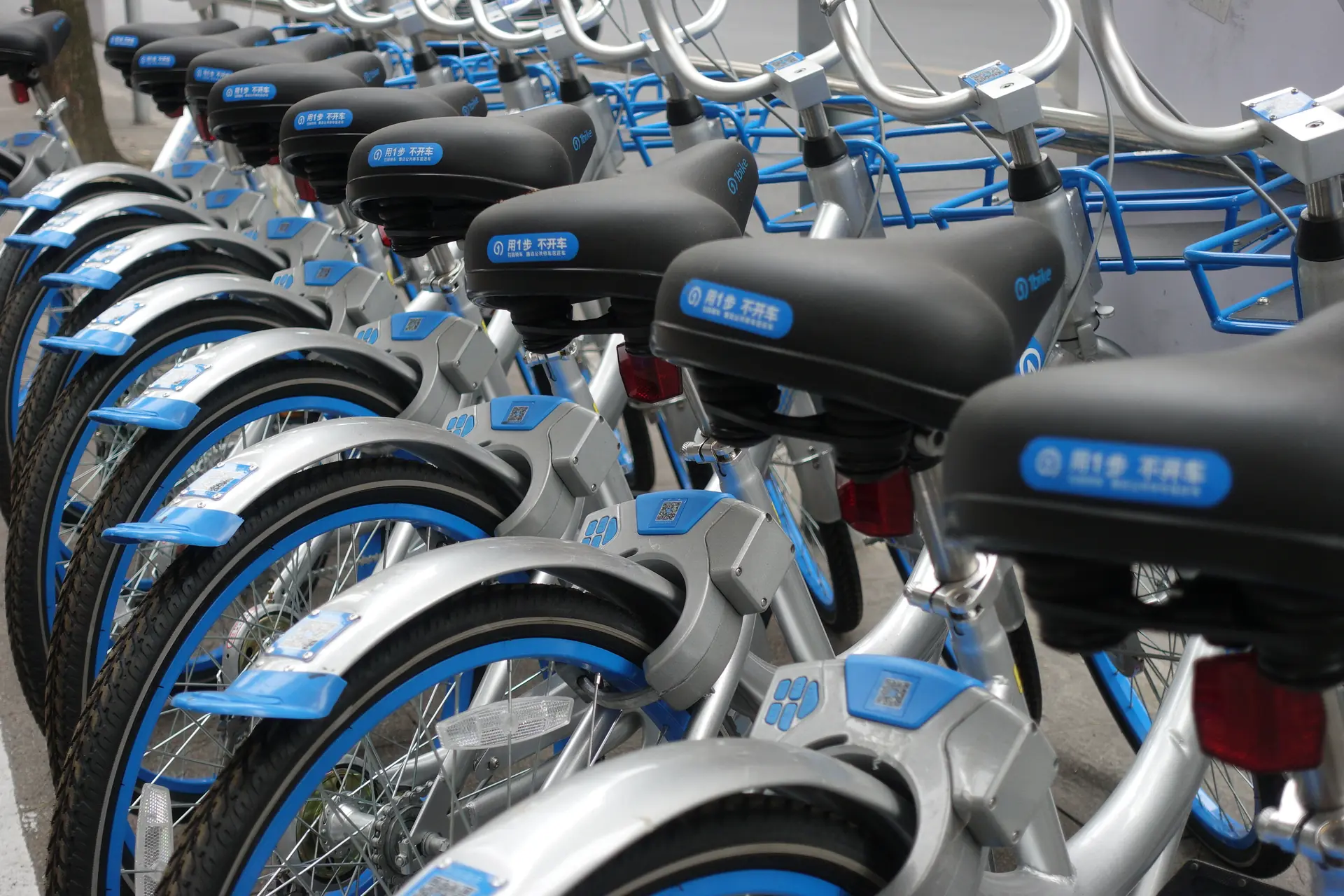
In most cities, blue means Hellobike (哈啰单车), yellow means Meituan Bike (美团单车), and green means Didi Qingju (青桔单车).
Scan the bike QR code first; if the app asks for a different mini program, payment authorization, passport details, or a deposit, follow the live screen rather than forcing one fixed method.
Starter setup
Working Alipay, WeChat Pay, mobile data, and precise location permission.
Ride length
About 5-20 minutes. For longer cross-town trips, metro or Didi is more comfortable.
Brand caveat
Do not assume every brand unlocks the same way. App prompts, deposits, and identity checks change by city, brand, and account history.
¥2+
Short urban ride
5-20 min
Best ride length
3 colors
Main brand cue
GPS
Parking check
Choose Meituan, Hellobike, or Qingju
In many Chinese cities, sidewalks are filled with three dominant brands. Color is the quickest way to identify which app ecosystem you are entering:
🟡Meituan Bike
Meituan Bike (美团单车) uses yellow bikes and is tied to the Meituan ecosystem. In many cities, the most reliable path is the Meituan app or a Meituan mini program opened after scanning the bike code.
🔵Hellobike
Hellobike (哈啰单车) uses blue bikes. Shanghai's English city guide lists Hellobike as rentable through the Hellobike app or Alipay. For mainland China, try Alipay → 哈啰骑行 or the mainland Hellobike/哈啰 app first.
🟢Didi Qingju
Didi Qingju (青桔单车) uses green or greenish-blue bikes and sits inside the Didi ecosystem. Expect the Didi or Didi Qingju flow, and be ready for passport-based identity prompts.
Regular Bikes vs. E-Bikes
Major operators offer regular pedal bikes, and many second- and third-tier cities also have shared e-bikes.
Regular bikes
They have a thinner frame and no battery compartment.
E-bikes
They have a bulkier frame with a visible battery pack, commonly on the frame or above the rear wheel, and a power display on the handlebars.
E-bikes are easier to pedal and useful for hilly cities, but the 25 km/h figure is a vehicle-design or assistance cap, not permission to ride that fast everywhere. Follow the app, signs, bike-lane conditions, and local speed rules.
Unlock with Alipay, WeChat, or Apps
There is no single perfect tourist path because bike companies use mini programs, standalone apps, credit-score systems, and city-level parking rules. The practical flow is simple: scan first, read the prompt, authorize only what you understand, and switch bike color if one brand blocks you.
- Pick a bike with enough battery and a clean QR code- For regular bikes, check brakes and seat height. For e-bikes, check battery level before unlocking.
- Scan the bike QR code- Start with Alipay or WeChat Scan if those apps already work for payments.
- Follow the brand prompt- The QR can open Hellobike, Meituan, Qingju, Didi, or a mini program authorization screen.
- Approve payment and location access- Read deposit, pass, and auto-payment screens carefully before tapping confirm.
- Wait for the lock to open- If nothing happens after a few seconds, report the bike in the app and scan another one.
Alipay Scan
Start here if Alipay already works
If you already have Alipay set up with a linked card, try it first. Open Alipay → Scan, point at the bike QR code, and let the page decide whether it can open a mini program directly.
Hellobike is the best-documented Alipay path in official Shanghai guidance; for Meituan and Qingju, follow the screen if it sends you to the brand app or mini program flow.
Do not expect zero registration
This is still faster than downloading three separate apps on the street. Just avoid treating "Alipay scan" as guaranteed zero-registration: first-time screens can ask for phone login, payment authorization, a deposit, or real-name details.
Mainland Hellobike vs. HelloRide
Mainland blue bikes
For blue Hellobike bikes in mainland China, use Alipay → 哈啰骑行 or the mainland Hellobike / 哈啰 app when the scan prompt sends you there.
This is the path listed in Shanghai's English shared-bike guide and the route most visitors should try before installing another app on the street.
HelloRide is not the mainland default
HelloRide is Hellobike's overseas-facing app, with official site coverage shown for places such as Hong Kong, Singapore, Malaysia, and Australia. In mainland China, use HelloRide only if the app itself shows service coverage for your location.
WeChat and Brand Apps
Use WeChat Scan or search the service name
WeChat Scan can also open bike mini programs when your WeChat Pay setup is working. If the scan route stalls, search inside WeChat or Alipay for the Chinese service name:
For Qingju, the Didi app or Didi Qingju entry is the cleaner path.
Which method should tourists try first?
Start with the payment app you already trust. If Alipay is tested and linked to your card, try Alipay Scan. If WeChat Pay is your stronger setup, try WeChat Scan. If you keep seeing blue bikes, use Alipay → 哈啰骑行 or the mainland Hellobike/哈啰 app before trying any overseas HelloRide flow.
First-Ride Checks
- Phone number: Foreign numbers can work, but SMS codes can arrive late. Do first-time setup at your hotel on Wi-Fi rather than while standing in traffic; if codes or app pages stall, use the internet troubleshooting guide.
- Identity verification: Didi Qingju commonly asks for passport-based real-name steps. Other brands can also ask depending on account status.
- Payment authorization: Watch for monthly-pass, deposit, pre-authorization, or top-up prompts. Do not tap through a Chinese screen you have not translated, and keep the credit and debit card guide nearby if your linked card fails.
- Precise location: Enable precise location for Alipay, WeChat, Didi, Meituan, Hellobike/哈啰, or the brand app you use. Approximate location can break unlocking and parking detection.
Pro tip for first-time setup
Complete your registration at the hotel on Wi-Fi before heading out. SMS verification codes to foreign numbers can take a few minutes.
Street unlock speed
Once set up, scanning and unlocking takes under 5 seconds on the street.
Ride, Park, and End the Trip
Most Chinese roads have a dedicated non-motor vehicle lane, marked with green paint, curb separation, or traffic signs. Ride on the right, keep both hands free, and treat the bike lane as a mixed space for bicycles, e-bikes, delivery riders, scooters, and pedestrians.
- Stay in the bike lane- If there is no lane, keep close to the right side and avoid motor-vehicle lanes.
- Slow down at intersections- Right-turning cars and fast delivery e-bikes are the main surprise for visitors.
- Park in a marked zone- Look for white-lined sidewalk boxes or app-approved parking areas.
- Close the lock and confirm the trip ended- Push the lock until it clicks, then check the app for the final charge.
- Photograph the parked bike- A quick photo can help if GPS drift creates a wrong parking fee.
Parking rules matter
No-park zones
No-parking and out-of-service zones are app-specific. Landmark plazas, waterfronts, airports, parks, and crowded tourist cores can be fenced off in one brand but not another.
Out-of-zone returns
The app can refuse to end the trip, ask you to move the bike, charge a dispatch fee, or restrict future rentals. Do not rely on simply paying a fee.
Repeat violations
Repeated parking problems can trigger account restrictions, deposits, or higher-risk prompts, depending on city, brand, and account history.
Before locking
Check the app map — returnable zones appear in blue/green, restricted zones in red.
GPS gotcha
Some users report being incorrectly charged out-of-zone fees due to GPS drift. Always take a photo of your parked bike as evidence in case you need to dispute a charge.
E-bike start check
If you unlock an e-bike, press the power button on the handlebars to activate the motor after the lock opens. Check the battery level in the app before riding; below 20%, swap for another bike so you do not run out mid-route.
Costs, Passes, and Deposits
Cost references vary by city, brand, bike type, and account status.
Regular bike
Commonly ~¥1.5-3 for a short ride. Brand and city pricing varies.
E-bike
Usually higher than a regular bike. Watch the app's live price before unlocking.
Deposit / pre-authorization
Waived on many accounts, but still read the screen. First-time foreign accounts can see a refundable deposit prompt.
Out-of-zone return
Surcharge applies. Parking outside designated areas can trigger the fee.
E-bike low-battery return
Low-battery return can cost extra. Check the app warning before ending an e-bike trip.
A short urban ride commonly lands around ¥2-5. Payment is deducted automatically through the app or mini program after you lock the bike, so always confirm the trip ended before walking away.
Ride passes for longer stays
If you're staying a week or more and cycling daily, check the app for a monthly pass. Hellobike and Meituan commonly show passes around ¥10-15/month, but read the fine print: some passes cover regular bikes only, cap the free minutes per ride, or renew automatically.
E-Bike Rules and Safety
✅When E-Bikes Shine
Distances over 2 km. Hilly cities like Chongqing, Qingdao, or Xiamen. Hot weather when you don't want to arrive drenched in sweat. When you're short on time.
🚲When Regular Bikes Are Better
Short distances under 1 km. Leisurely sightseeing rides. When you don't want to worry about battery levels or surcharges. In some megacity cores, regular pedal bikes are easier to find than shared e-bikes.
E-bike caveats to know
Speed cap
Compliant e-bikes are designed around a maximum assisted speed of 25 km/h, but local road limits can be lower; Shanghai's official English guide, for example, lists 15 km/h as the public-road maximum. If the motor cuts out, keep pedaling normally.
Helmet rules
Shanghai's English e-bike guide says riders must wear helmets. Beijing's revised non-motor-vehicle rules, in effect from May 1, 2026, make proper helmet use a legal obligation for electric-bicycle riders and passengers. Do not assume a shared e-bike will have a clean, usable helmet; if local rules require one and the bike does not provide one, choose a regular bike, metro, or Didi instead.
Weight and braking
E-bikes are heavier than regular bikes. Steering and braking feel different, especially in rain or on crowded bike lanes.
No passengers
Shared bikes and shared e-bikes are not for carrying another adult or child.
Key Traffic Rules for Cyclists
No wrong-way riding
Always ride with the traffic flow in the bike lane.
No passengers
Shared bikes cannot carry another person, front or back.
No phone use while riding
Keep both hands on the handlebars.
Stop at red lights
Treat traffic signals the same as you would in a car.
Stay in the bike lane
Switching to motor vehicle lanes is both illegal and dangerous.
No expressways or elevated roads
Bicycles and e-bikes must not enter motor-vehicle-only roads, expressways, or elevated urban roads.
Safety Advice
Watch for delivery riders
The bike lane is shared with food delivery e-bikes, who ride fast and unpredictably.
Intersections need extra care
Even with a green light, look both ways — right-turning cars and red-light-running e-bikes are common.
Night riding is risky
Most shared bikes have weak or no front lights — visibility is poor after dark.
Rain is a bad idea
Wet roads are slippery, braking distances increase, and most bikes lack fenders.
Secure your phone
Don't put your phone in the bike basket — bumps and potholes can bounce it out.
Troubleshooting for Foreign Users
Before your first scan, check these settings:
- Location permission: Enable Precise Location for Alipay, WeChat, Meituan, Didi, Hellobike/哈啰, or the brand app you use — "Approximate Location" will not work.
- Bluetooth: Some locks require Bluetooth — keep it on.
- Mobile data: Scanning and unlocking require an internet connection.
- Translation shortcut: Screenshot Chinese prompts and translate them before accepting deposits, passes, or identity screens.
🔒Bike Won't Unlock
Do not keep retrying the same bike. Report the issue if the app offers that button, then scan another bike nearby. Dead batteries, damaged QR codes, and broken locks are common.
📍Parking Fee Looks Wrong
Open ride history, submit an appeal, and attach your parked-bike photo. Response times vary, so the better habit is prevention: check the parking zone before locking.
📶SMS or Data Fails
Move to hotel, mall, metro-station, or cafe Wi-Fi for first-time setup. Verification codes to foreign numbers can lag, and some brand apps behave better on stable internet; if the problem repeats, use the internet troubleshooting guide.
💳Deposit Appears
Some accounts are asked for a refundable deposit or pre-authorization because they have no local credit-score history. Translate the screen, check your linked-card setup with the credit and debit card guide, and decide whether the short ride is worth it.
Frequently Asked Questions
Not always. Many visitors can start through Alipay, WeChat, or a brand mini program with a foreign number, but SMS delivery can be slow and some brand flows still prefer local phone verification. Do first-time setup on stable Wi-Fi.
Sources checked for this guide
- Shanghai English municipal guide to shared-bike brands and rental paths: Shanghai shared-bike guide
- Shanghai official e-bike registration and riding-rule guide: Shanghai e-bike rules
- Beijing English portal summary of revised non-motor-vehicle rules effective May 1, 2026: Beijing e-bike helmet and road-rule update
- HelloRide Global official site used to distinguish the overseas HelloRide app from mainland Hellobike/哈啰 bike flows: HelloRide Global
- Shanghai international visitor guide PDF used as a cross-check for app/mini-program unlocking, approximate short-ride cost, and designated-parking advice: Shanghai visitor guide PDF
Beyond This Guide
Shared bikes are only one piece of the city-mobility stack. Use these next if you are building a full first-trip setup:
- China Navigation Apps: Amap, Maps.me & Apple Maps — find bike lanes, walking routes, and parking areas more confidently.
- Getting Around Chinese Cities — connect bikes with metro, Didi, taxis, and airport transfers.
- China Internet Troubleshooting — fix SMS, data, app-loading, VPN, and captive-portal problems before they block a scan.
- Credit & Debit Cards in China — understand linked-card failures, deposits, pre-authorizations, and card backups.
- Alipay for Foreign Tourists — set up the payment app most visitors try first for scanning.
- WeChat for Foreign Tourists — WeChat Pay, mini programs, and backup scan flows.
- Translation Apps — translate Chinese app prompts before accepting deposits or passes.
© gochinafreely.com — Original guide by Go China Freely.